<?xml version="1.0" encoding="utf-8"?>
<feed xmlns="http://www.w3.org/2005/Atom">
  <title>年轮说 | Ciel Ni</title>
  
  <subtitle>很高兴认识你</subtitle>
  <link href="/atom.xml" rel="self"/>
  
  <link href="http://www.cielni.com/"/>
  <updated>2021-09-30T15:39:24.408Z</updated>
  <id>http://www.cielni.com/</id>
  
  <author>
    <name>Ciel Ni</name>
    
  </author>
  
  <generator uri="http://hexo.io/">Hexo</generator>
  
  <entry>
    <title>SpringBoot 连接 MySQL 8.0 的时区问题</title>
    <link href="http://www.cielni.com/2021/09/30/mysql8-timezone/"/>
    <id>http://www.cielni.com/2021/09/30/mysql8-timezone/</id>
    <published>2021-09-30T04:54:41.000Z</published>
    <updated>2021-09-30T15:39:24.408Z</updated>
    
    <content type="html"><![CDATA[<h2 id="背景"><a href="#背景" class="headerlink" title="背景"></a>背景</h2><p>因为数据库要升级到 MySQL 8.0 所以要对架构做升级，主要的修改工作如下：</p><ul><li><p>驱动包要升级为 mysql-connector-java-8.0.11.jar</p></li><li><p>JDBC driver 由 com.mysql.jdbc.Driver 改为 com.mysql.cj.jdbc.Driver</p></li><li><p>JDBC url 中加上 userSSL=false</p></li></ul><h2 id="问题"><a href="#问题" class="headerlink" title="问题"></a>问题</h2><p>升级以后发现通过 Mybatisplus 从数据库获取的时间字段值和数据库的值会有几小时的差异，这其实是程序所在时区和数据库的时区不一致导致的。</p><a id="more"></a> <h2 id="解决方法"><a href="#解决方法" class="headerlink" title="解决方法"></a>解决方法</h2><p>解决方案有两个</p><h3 id="修改程序默认时区"><a href="#修改程序默认时区" class="headerlink" title="修改程序默认时区"></a>修改程序默认时区</h3><p>通过代码将程序的系统默认时区改成和数据库的时区一致，如果数据库时区为0时区，那需要将程序的系统时区改成0时区。<br><figure class="highlight plain"><table><tr><td class="gutter"><pre><div class="line">1</div></pre></td><td class="code"><pre><div class="line">TimeZone.setDefault(TimeZone.getTimeZone(&quot;Asia/Shanghai&quot;))</div></pre></td></tr></table></figure></p><h3 id="修改数据库时区"><a href="#修改数据库时区" class="headerlink" title="修改数据库时区"></a>修改数据库时区</h3><p>通过在JDBC url 增加参数，使数据库时区和程序系统时区一致：</p><p>如果你是在本地运行代码，在 JDBC url 加上 &amp;serverTimezone=Asia/Shanghai 或者 &amp;serverTimezone=GMT%2B8</p><p>如果你的程序是在服务器上运行，则加上&amp;serverTimezone={服务器的时区}，0时区的话就是UTC。</p><h2 id="参考资料"><a href="#参考资料" class="headerlink" title="参考资料"></a>参考资料</h2><ul><li><a href="https://dev.mysql.com/doc/refman/8.0/en/time-zone-support.html" target="_blank" rel="external">MySQL Server Time Zone Support</a></li><li><a href="https://blog.csdn.net/f2006116/article/details/81224569" target="_blank" rel="external">com.mysql.jdbc.Driver 和 com.mysql.cj.jdbc.Driver的区别</a></li></ul><hr><blockquote><p>文章标题：<a href="http://www.cielni.com/2021/09/30/mysql8-timezone/">连接 MySQL 8.0 的时区问题</a><br>文章作者：<a href="http://www.cielni.com/about/">Ciel Ni</a><br>文章链接：<a href="http://www.cielni.com/2021/09/30/mysql8-timezone/">http://www.cielni.com/2021/09/30/mysql8-timezone/</a><br>有问题或建议欢迎与我联系讨论，转载或引用希望标明出处，感激不尽！</p></blockquote>]]></content>
    
    <summary type="html">
    
      &lt;h2 id=&quot;背景&quot;&gt;&lt;a href=&quot;#背景&quot; class=&quot;headerlink&quot; title=&quot;背景&quot;&gt;&lt;/a&gt;背景&lt;/h2&gt;&lt;p&gt;因为数据库要升级到 MySQL 8.0 所以要对架构做升级，主要的修改工作如下：&lt;/p&gt;
&lt;ul&gt;
&lt;li&gt;&lt;p&gt;驱动包要升级为 mysql-connector-java-8.0.11.jar&lt;/p&gt;
&lt;/li&gt;
&lt;li&gt;&lt;p&gt;JDBC driver 由 com.mysql.jdbc.Driver 改为 com.mysql.cj.jdbc.Driver&lt;/p&gt;
&lt;/li&gt;
&lt;li&gt;&lt;p&gt;JDBC url 中加上 userSSL=false&lt;/p&gt;
&lt;/li&gt;
&lt;/ul&gt;
&lt;h2 id=&quot;问题&quot;&gt;&lt;a href=&quot;#问题&quot; class=&quot;headerlink&quot; title=&quot;问题&quot;&gt;&lt;/a&gt;问题&lt;/h2&gt;&lt;p&gt;升级以后发现通过 Mybatisplus 从数据库获取的时间字段值和数据库的值会有几小时的差异，这其实是程序所在时区和数据库的时区不一致导致的。&lt;/p&gt;
    
    </summary>
    
      <category term="后端笔记" scheme="http://www.cielni.com/categories/%E5%90%8E%E7%AB%AF%E7%AC%94%E8%AE%B0/"/>
    
    
      <category term="java" scheme="http://www.cielni.com/tags/java/"/>
    
      <category term="MySQL" scheme="http://www.cielni.com/tags/MySQL/"/>
    
  </entry>
  
  <entry>
    <title>SqlServer读取image类型字段并存文件</title>
    <link href="http://www.cielni.com/2021/09/30/sqlserver-image2file/"/>
    <id>http://www.cielni.com/2021/09/30/sqlserver-image2file/</id>
    <published>2021-09-30T03:54:41.000Z</published>
    <updated>2021-09-30T15:33:46.958Z</updated>
    
    <content type="html"><![CDATA[<h2 id="背景"><a href="#背景" class="headerlink" title="背景"></a>背景</h2><p>金蝶云上传文件的结果会以image类型保存在SqlServer数据库，现在希望用代码的方式把这部分文件批量导出</p><h2 id="代码"><a href="#代码" class="headerlink" title="代码"></a>代码</h2><figure class="highlight plain"><table><tr><td class="gutter"><pre><div class="line">1</div><div class="line">2</div><div class="line">3</div><div class="line">4</div><div class="line">5</div><div class="line">6</div><div class="line">7</div><div class="line">8</div><div class="line">9</div><div class="line">10</div><div class="line">11</div><div class="line">12</div><div class="line">13</div><div class="line">14</div></pre></td><td class="code"><pre><div class="line">sql = &quot;SELECT * FROM T_BAS_Attachment&quot;</div><div class="line">self.cursor.execute(sql)</div><div class="line">res = self.cursor.fetchall()</div><div class="line">for item in res:</div><div class="line"> content = item[10]</div><div class="line">    data = io.BytesIO(content)</div><div class="line">    filename = item[4]</div><div class="line">    if filename is not None:</div><div class="line">        directory = &apos;/Users/insta360/Downloads/attachment/&apos; + item[1]</div><div class="line">        if not os.path.exists(directory):</div><div class="line">            os.makedirs(directory)</div><div class="line">        with open(directory + &apos;/&apos; + item[5] + &apos;_&apos; + item[4], &apos;wb&apos;) as f:</div><div class="line">            f.write(data.getvalue())</div><div class="line">            data.close()</div></pre></td></tr></table></figure>]]></content>
    
    <summary type="html">


        &lt;h2 id=&quot;背景&quot;&gt;&lt;a href=&quot;#背景&quot; class=&quot;headerlink&quot; title=&quot;背景&quot;&gt;&lt;/a&gt;背景&lt;/h2&gt;&lt;p&gt;金蝶云上传文件的结果会以image类型保存在SqlServer数据库，现在希望用代码的方式把这部分文件批量导出&lt;/p&gt;
&lt;h2 id=&quot;代码
      
    
    </summary>
    
      <category term="后端笔记" scheme="http://www.cielni.com/categories/%E5%90%8E%E7%AB%AF%E7%AC%94%E8%AE%B0/"/>
    
    
      <category term="数据库" scheme="http://www.cielni.com/tags/%E6%95%B0%E6%8D%AE%E5%BA%93/"/>
    
      <category term="SqlServer" scheme="http://www.cielni.com/tags/SqlServer/"/>
    
  </entry>
  
  <entry>
    <title>Java 调用 CMD 命令时路径名带空格的解决方案</title>
    <link href="http://www.cielni.com/2021/07/24/java-cmd/"/>
    <id>http://www.cielni.com/2021/07/24/java-cmd/</id>
    <published>2021-07-24T07:44:52.000Z</published>
    <updated>2021-07-24T07:42:45.533Z</updated>
    
    <content type="html"><![CDATA[<h2 id="背景"><a href="#背景" class="headerlink" title="背景"></a>背景</h2><p>当我们在终端执行命令行时，如果遇到带空格的路径名，往往有两种处理方法</p><figure class="highlight plain"><table><tr><td class="gutter"><pre><div class="line">1</div><div class="line">2</div><div class="line">3</div><div class="line">4</div><div class="line">5</div></pre></td><td class="code"><pre><div class="line">cat a\ b\ c.txt</div><div class="line">测试内容</div><div class="line"></div><div class="line">cat &apos;a b c.txt&apos;</div><div class="line">测试内容</div></pre></td></tr></table></figure><p>而当我们在Java使用 <code>Runtime.getRuntime().exec()</code> 执行上面的命令时，却得不到想要的结果</p><a id="more"></a> <h2 id="分析"><a href="#分析" class="headerlink" title="分析"></a>分析</h2><p>想要解决该问题，首先分析 <code>exec(String cmd)</code> 方法的源码</p><figure class="highlight plain"><table><tr><td class="gutter"><pre><div class="line">1</div><div class="line">2</div><div class="line">3</div><div class="line">4</div><div class="line">5</div><div class="line">6</div><div class="line">7</div><div class="line">8</div><div class="line">9</div><div class="line">10</div><div class="line">11</div><div class="line">12</div></pre></td><td class="code"><pre><div class="line">public Process exec(String command, String[] envp, File dir)</div><div class="line">    throws IOException &#123;</div><div class="line">    if (command.length() == 0)</div><div class="line">        throw new IllegalArgumentException(&quot;Empty command&quot;);</div><div class="line"></div><div class="line">    StringTokenizer st = new StringTokenizer(command);</div><div class="line">    String[] cmdarray = new String[st.countTokens()];</div><div class="line">    for (int i = 0; st.hasMoreTokens(); i++)</div><div class="line">        cmdarray[i] = st.nextToken();</div><div class="line">    return exec(cmdarray, envp, dir);</div><div class="line">&#125;</div><div class="line">```</div></pre></td></tr></table></figure><p>public StringTokenizer(String str) {<br>    this(str, “ \t\n\r\f”, false);<br>}</p><p>public StringTokenizer(String str, String delim, boolean returnDelims) {<br>    currentPosition = 0;<br>    newPosition = -1;<br>    delimsChanged = false;<br>    this.str = str;<br>    maxPosition = str.length();<br>    delimiters = delim;<br>    retDelims = returnDelims;<br>    setMaxDelimCodePoint();<br>}<br><figure class="highlight plain"><table><tr><td class="gutter"><pre><div class="line">1</div><div class="line">2</div><div class="line">3</div><div class="line">4</div></pre></td><td class="code"><pre><div class="line">可以看到，首先会将CMD命令构造成一个 StringTokenizer 对象，该对象的默认分隔符是`&quot; \t\n\r\f&quot;`, 也就是常见的空格符、换行符、制表符。也就是说，只要命令出现了这些符号，不管有没有带上转移或者引号，都会被分割成 `cmdarry` ，流入后面的方法`exec(String[] cmdarray)`。</div><div class="line"></div><div class="line">## 解决方案</div><div class="line">其实到这一步我们已经知道该怎么解决了，我们肯定不能修改它默认的分隔符，因为这样的话 所有的空格都将不会被分割。所以我们只能跳过源码分割阶段，自己分割CMD命令，然后直接将`cmdarray`传给`exec(String[] cmdarray)`方法 。代码如下，注意前两行代码：</div></pre></td></tr></table></figure></p><p>String[] cmdarray = new String[]{“cat”, “/Users/ciel/Downloads/a b c.txt”};<br>Process process = Runtime.getRuntime().exec(cmdarray);<br>InputStream in = process.getInputStream();<br>InputStreamReader reader = new InputStreamReader(in);<br>BufferedReader br = new BufferedReader(reader);<br>StringBuffer sb = new StringBuffer();<br>String message;<br>while ((message = br.readLine()) != null) {<br>    sb.append(message);<br>}<br>System.out.println(sb);</p><p>// 得到文件的内容：<br>// 测试内容<br>```</p><h2 id="参考资料"><a href="#参考资料" class="headerlink" title="参考资料"></a>参考资料</h2><ul><li><a href="https://blog.csdn.net/xuecancan/article/details/79389496" target="_blank" rel="external">Java 执行cmd程序，并获取命令行内容</a></li></ul><hr><blockquote><p>文章标题：<a href="http://www.cielni.com/2021/07/24/java-cmd/">Java 调用 CMD 命令时路径名带空格的解决方案</a><br>文章作者：<a href="http://www.cielni.com/about/">Ciel Ni</a><br>文章链接：<a href="http://www.cielni.com/2021/07/24/java-cmd/">http://www.cielni.com/2021/07/24/java-cmd/</a><br>有问题或建议欢迎与我联系讨论，转载或引用希望标明出处，感激不尽！</p></blockquote>]]></content>
    
    <summary type="html">
    
      &lt;h2 id=&quot;背景&quot;&gt;&lt;a href=&quot;#背景&quot; class=&quot;headerlink&quot; title=&quot;背景&quot;&gt;&lt;/a&gt;背景&lt;/h2&gt;&lt;p&gt;当我们在终端执行命令行时，如果遇到带空格的路径名，往往有两种处理方法&lt;/p&gt;
&lt;figure class=&quot;highlight plain&quot;&gt;&lt;table&gt;&lt;tr&gt;&lt;td class=&quot;gutter&quot;&gt;&lt;pre&gt;&lt;div class=&quot;line&quot;&gt;1&lt;/div&gt;&lt;div class=&quot;line&quot;&gt;2&lt;/div&gt;&lt;div class=&quot;line&quot;&gt;3&lt;/div&gt;&lt;div class=&quot;line&quot;&gt;4&lt;/div&gt;&lt;div class=&quot;line&quot;&gt;5&lt;/div&gt;&lt;/pre&gt;&lt;/td&gt;&lt;td class=&quot;code&quot;&gt;&lt;pre&gt;&lt;div class=&quot;line&quot;&gt;cat a\ b\ c.txt&lt;/div&gt;&lt;div class=&quot;line&quot;&gt;测试内容&lt;/div&gt;&lt;div class=&quot;line&quot;&gt;&lt;/div&gt;&lt;div class=&quot;line&quot;&gt;cat &amp;apos;a b c.txt&amp;apos;&lt;/div&gt;&lt;div class=&quot;line&quot;&gt;测试内容&lt;/div&gt;&lt;/pre&gt;&lt;/td&gt;&lt;/tr&gt;&lt;/table&gt;&lt;/figure&gt;
&lt;p&gt;而当我们在Java使用 &lt;code&gt;Runtime.getRuntime().exec()&lt;/code&gt; 执行上面的命令时，却得不到想要的结果&lt;/p&gt;
    
    </summary>
    
      <category term="Java笔记" scheme="http://www.cielni.com/categories/Java%E7%AC%94%E8%AE%B0/"/>
    
    
      <category term="java" scheme="http://www.cielni.com/tags/java/"/>
    
  </entry>
  
  <entry>
    <title>使用 Coding 进行网站托管时的域名解析采坑之旅</title>
    <link href="http://www.cielni.com/2021/07/04/coding-deposit/"/>
    <id>http://www.cielni.com/2021/07/04/coding-deposit/</id>
    <published>2021-07-04T13:44:52.000Z</published>
    <updated>2021-07-11T14:44:26.665Z</updated>
    
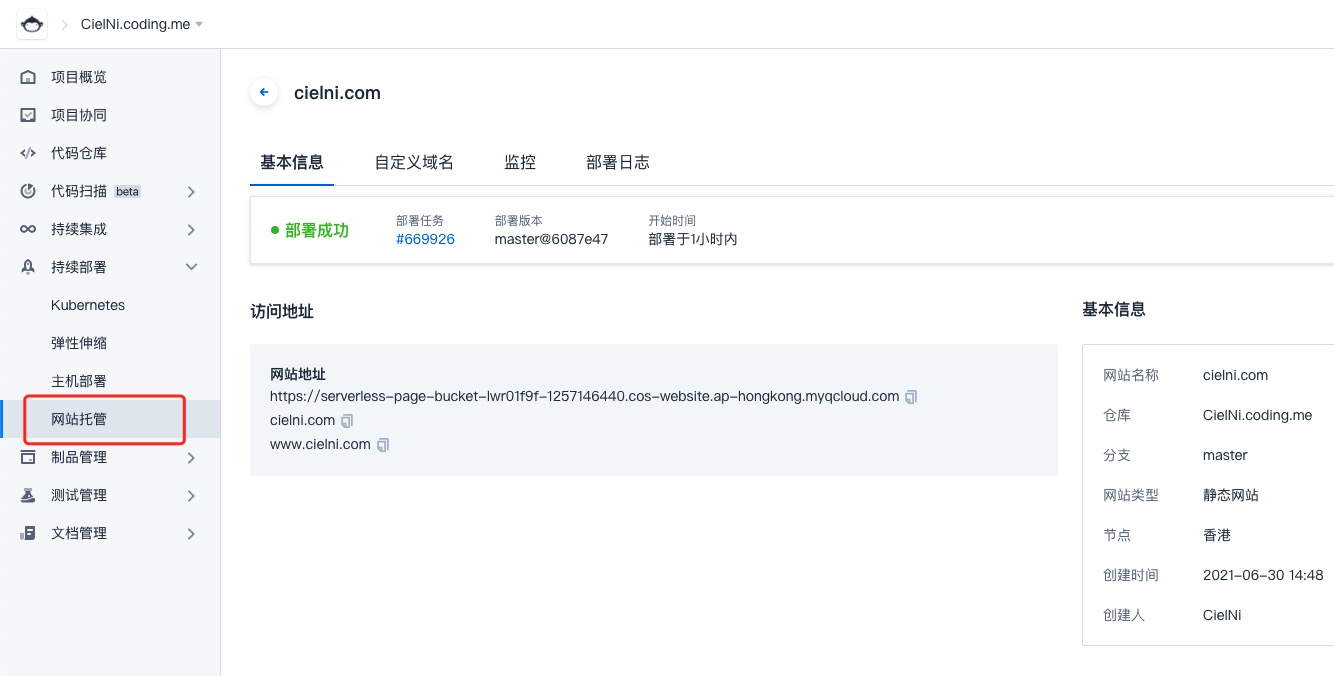
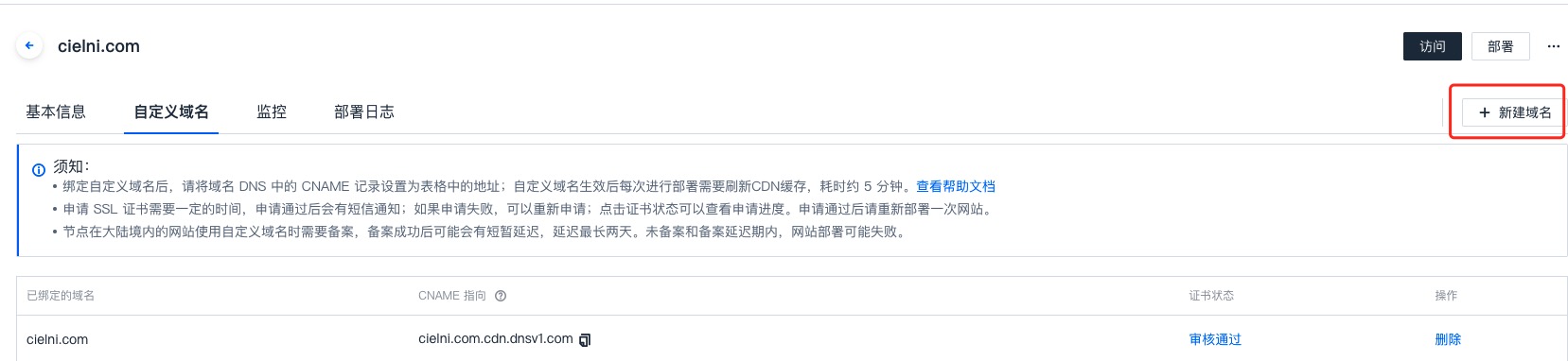
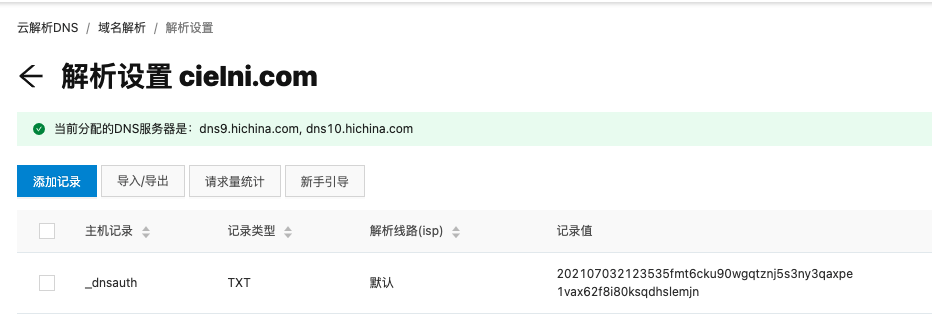
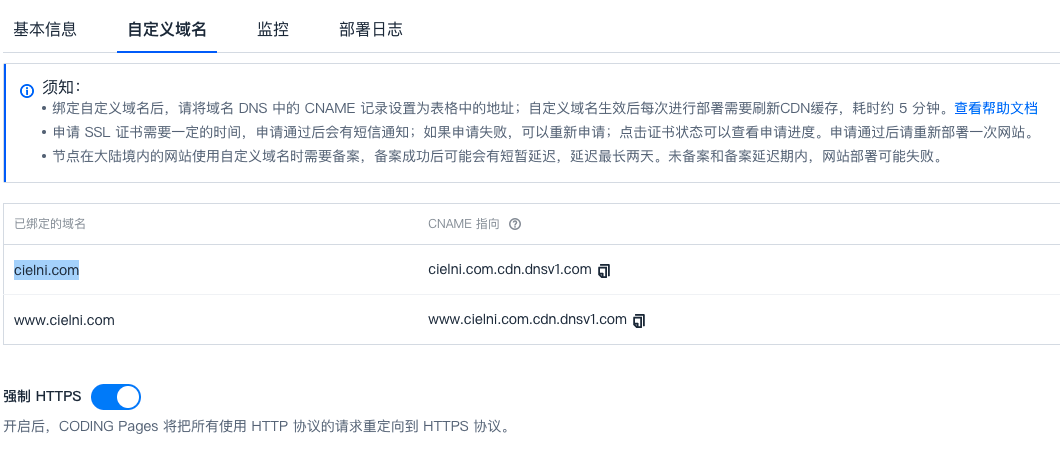
    <content type="html"><![CDATA[<h2 id="背景"><a href="#背景" class="headerlink" title="背景"></a>背景</h2><p>因为 <a href="https://coding.net/" target="_blank" rel="external">coding.net</a> 经常改版，导致我之前用 Coding Pages 进行的托管不知何时失效了，于是去官网看了下，意识到需要重新设置网站托管。（印象中，coding 最几年一直在做产品调整，每次点进它的网页，都不太一样）</p><p><img src="https://z3.ax1x.com/2021/07/04/RfRr5R.jpg" alt="图挂了。。"></p><a id="more"></a> <h2 id="配置域名"><a href="#配置域名" class="headerlink" title="配置域名"></a>配置域名</h2><p>首先是添加需要关联的域名，添加以后证书状态会显示审核中，点击【审核中】，跳转到腾讯云进行域名验证。关于这一步的操作我就不赘述了，大概流程就是需要在域名解析增加一条规定的记录来证明该域名确实是你自己的。</p><p><img src="https://z3.ax1x.com/2021/07/04/RfhY8I.jpg" alt="图挂了"><br><img src="https://z3.ax1x.com/2021/07/04/Rf4Xpn.png" alt="图挂了"></p><p>审核完以后，你就可以把 Coding 告诉你的 CNAME 指向，添加到域名解析中。</p><h2 id="域名问题"><a href="#域名问题" class="headerlink" title="域名问题"></a>域名问题</h2><p>当我以为大功告成的时候，却出现了一个问题。此时我访问 cielni.com 是ok的，但访问 www.cielni.com 的时候，却显示The requested URL ‘/‘ was not found on this server。可我明明配了www的主机记录呀。<br>经过一番查阅后，在知乎上看了了一个比较靠谱的答案：</p><blockquote><p><a href="https://www.zhihu.com/question/275263324/answer/995244157" target="_blank" rel="external">requested URL ‘/‘ was not found on this server. ？ - 极客兔子的回答 - 知乎</a></p></blockquote><p>引用一下里面的结论就是</p><blockquote><p>使用什么域名接入腾讯云CDN服务，那就应该使用正确的域名做CNAME解析，例如以下示例。</p><p>错误的CNAME解析：</p><p>blog.douniwan.club -&gt; douniwan.club.cdn.dnsv1.com</p><p>www.douniwan.cluub -&gt; douniwan.club.cdn.dnsv1.com </p><p>正确的CNAME解析：</p><p>douniwan.club -&gt; douniwan.club.cdn.dnsv1.com</p><p>www.douniwan.cluub -&gt; www.douniwan.club.cdn.dnsv1.com</p></blockquote><p>也就是说，在使用腾讯云的 CNAME 指向时，www 类型的主机记录，相应的就需要 www 开头的 CNAME值。<br>于是我修改了我的域名解析设置：<br><img src="https://z3.ax1x.com/2021/07/04/Rf7YGQ.png" alt="图挂了。。"></p><p>但是，我等了十分钟解析生效以后，问题还是存在。</p><h2 id="Finally"><a href="#Finally" class="headerlink" title="Finally"></a>Finally</h2><p>我继续看了下那个知乎的提问，注意到了腾讯云的官方回答：</p><p><a href="https://www.zhihu.com/question/275263324/answer/379151027" target="_blank" rel="external">requested URL ‘/‘ was not found on this server. ？ - 腾讯云小助手的回答 - 知乎</a></p><blockquote><p>加速域名是精准匹配的，www. ruankun.xyz 如果需要访问加速，需要单独在CDN 接入，获取新的CNAME，配置即可。</p></blockquote><p>虽然他说的是 CDN 的问题，但我瞬间明白了，我并没有想腾讯云申请 www 开头的 CNAME 指向，所以我在域名解析添加的 www.cielni.com.cdn.dnsv1.com 其实是不存在的。往前溯源，其实是因为我在 Coding 只绑定了 cielni.com 这个域名，而没有绑定 www.cielni.com。于是我果断去 Coding 增加了域名绑定，果然得到了 www.cielni.com.cdn.dnsv1.com 这个 CNAME 指向。</p><p><img src="https://z3.ax1x.com/2021/07/04/RfqwqI.png" alt="图挂了。。"></p><p>重新部署以后访问 <a href="http://www.cielni.com">www.cielni.com</a> 成功！<br>Case closed.</p><h2 id="参考资料"><a href="#参考资料" class="headerlink" title="参考资料"></a>参考资料</h2><ul><li><a href="https://www.zhihu.com/question/275263324" target="_blank" rel="external">requested URL ‘/‘ was not found on this server. ？ - 知乎</a></li><li><a href="https://cloud.tencent.com/developer/article/1190789" target="_blank" rel="external">腾讯云CDN域名解析错误引发的血案</a></li></ul><hr><blockquote><p>文章标题：<a href="http://www.cielni.com/2021/07/04/coding-deposit/">使用 Coding 进行网站托管时的域名解析采坑之旅</a><br>文章作者：<a href="http://www.cielni.com/about/">Ciel Ni</a><br>文章链接：<a href="http://www.cielni.com/2021/07/04/coding-deposit/">http://www.cielni.com/2021/07/04/coding-deposit/</a><br>有问题或建议欢迎与我联系讨论，转载或引用希望标明出处，感激不尽！</p></blockquote>]]></content>
    
    <summary type="html">
    
      &lt;h2 id=&quot;背景&quot;&gt;&lt;a href=&quot;#背景&quot; class=&quot;headerlink&quot; title=&quot;背景&quot;&gt;&lt;/a&gt;背景&lt;/h2&gt;&lt;p&gt;因为 &lt;a href=&quot;https://coding.net/&quot; target=&quot;_blank&quot; rel=&quot;external&quot;&gt;coding.net&lt;/a&gt; 经常改版，导致我之前用 Coding Pages 进行的托管不知何时失效了，于是去官网看了下，意识到需要重新设置网站托管。（印象中，coding 最几年一直在做产品调整，每次点进它的网页，都不太一样）&lt;/p&gt;
&lt;p&gt;&lt;img src=&quot;https://z3.ax1x.com/2021/07/04/RfRr5R.jpg&quot; alt=&quot;图挂了。。&quot;&gt;&lt;/p&gt;
    
    </summary>
    
      <category term="运维笔记" scheme="http://www.cielni.com/categories/%E8%BF%90%E7%BB%B4%E7%AC%94%E8%AE%B0/"/>
    
    
      <category term="运维" scheme="http://www.cielni.com/tags/%E8%BF%90%E7%BB%B4/"/>
    
      <category term="网络" scheme="http://www.cielni.com/tags/%E7%BD%91%E7%BB%9C/"/>
    
  </entry>
  
  <entry>
    <title>基于face-api.js的人脸实时跟踪</title>
    <link href="http://www.cielni.com/2020/03/07/brower-face-detect/"/>
    <id>http://www.cielni.com/2020/03/07/brower-face-detect/</id>
    <published>2020-03-07T11:54:41.000Z</published>
    <updated>2020-03-07T13:05:01.514Z</updated>
    
    <content type="html"><![CDATA[<p>疫情期间，公司选择让员工进行远程办公，却又难以监督员工保证他们的工时。所以老板想出了通过摄像头配合人脸识别算法，计算一天内员工在电脑面前的时间占比。</p><p><a href="https://github.com/NiShuang/browser_face_detect" target="_blank" rel="external">项目的Github地址</a></p><h2 id="通过浏览器开启摄像头"><a href="#通过浏览器开启摄像头" class="headerlink" title="通过浏览器开启摄像头"></a>通过浏览器开启摄像头</h2><p>这部分代码是在网上找的，需要兼容多种浏览器：<br><a id="more"></a> </p><figure class="highlight plain"><table><tr><td class="gutter"><pre><div class="line">1</div><div class="line">2</div><div class="line">3</div><div class="line">4</div><div class="line">5</div><div class="line">6</div><div class="line">7</div><div class="line">8</div><div class="line">9</div><div class="line">10</div><div class="line">11</div><div class="line">12</div><div class="line">13</div><div class="line">14</div><div class="line">15</div><div class="line">16</div><div class="line">17</div><div class="line">18</div><div class="line">19</div><div class="line">20</div><div class="line">21</div><div class="line">22</div><div class="line">23</div><div class="line">24</div><div class="line">25</div><div class="line">26</div><div class="line">27</div><div class="line">28</div><div class="line">29</div><div class="line">30</div><div class="line">31</div><div class="line">32</div><div class="line">33</div><div class="line">34</div><div class="line">35</div><div class="line">36</div><div class="line">37</div></pre></td><td class="code"><pre><div class="line">if (navigator.mediaDevices === undefined) &#123;</div><div class="line">navigator.mediaDevices = &#123;&#125;;</div><div class="line">&#125;</div><div class="line">if (navigator.mediaDevices.getUserMedia === undefined) &#123;</div><div class="line">avigator.mediaDevices.getUserMedia = function (constraints) &#123;// 首先，如果有getUserMedia的话，就获得它</div><div class="line">var getUserMedia = navigator.webkitGetUserMedia || navigator.mozGetUserMedia || navigator.msGetUserMedia;</div><div class="line"> </div><div class="line">    // 一些浏览器根本没实现它 - 那么就返回一个error到promise的reject来保持一个统一的接口</div><div class="line">    if (!getUserMedia) &#123;</div><div class="line">        return Promise.reject(new Error(&apos;getUserMedia is not implemented in this browser&apos;));</div><div class="line">    &#125;</div><div class="line"> </div><div class="line">    // 否则，为老的navigator.getUserMedia方法包裹一个Promise</div><div class="line">    return new Promise(function (resolve, reject) &#123;</div><div class="line">         getUserMedia.call(navigator, constraints, resolve, reject);</div><div class="line">    &#125;);</div><div class="line">&#125;</div><div class="line">&#125;</div><div class="line">const constraints = &#123;</div><div class="line">    video: true,</div><div class="line">    audio: false</div><div class="line">&#125;;</div><div class="line">let promise = navigator.mediaDevices.getUserMedia(constraints);</div><div class="line">promise.then(stream =&gt; &#123;</div><div class="line">    let v = document.getElementById(&apos;v&apos;);</div><div class="line">    // 旧的浏览器可能没有srcObject</div><div class="line">    if (&quot;srcObject&quot; in v) &#123;</div><div class="line">         v.srcObject = stream;</div><div class="line">    &#125; else &#123;</div><div class="line">     // 防止再新的浏览器里使用它，应为它已经不再支持了</div><div class="line">         v.src = window.URL.createObjectURL(stream);</div><div class="line">    &#125;</div><div class="line">    v.onloadedmetadata = function (e) &#123;</div><div class="line">        v.play();</div><div class="line">    &#125;;&#125;).catch(err =&gt; &#123;</div><div class="line">        console.error(err.name + &quot;: &quot; + err.message);</div><div class="line">&#125;)</div></pre></td></tr></table></figure><h2 id="人脸识别"><a href="#人脸识别" class="headerlink" title="人脸识别"></a>人脸识别</h2><p>人脸识别使用的是Github上的一个人脸识别库 <a href="https://github.com/justadudewhohacks/face-api.js" target="_blank" rel="external">face-api.js</a> 。face-api.js可以识别出视频流中人脸的轮廓和表情，调整识别精度等，Github上有详细的使用教程。</p><figure class="highlight plain"><table><tr><td class="gutter"><pre><div class="line">1</div><div class="line">2</div><div class="line">3</div><div class="line">4</div><div class="line">5</div><div class="line">6</div><div class="line">7</div><div class="line">8</div><div class="line">9</div><div class="line">10</div><div class="line">11</div><div class="line">12</div><div class="line">13</div><div class="line">14</div><div class="line">15</div><div class="line">16</div><div class="line">17</div><div class="line">18</div><div class="line">19</div><div class="line">20</div><div class="line">21</div></pre></td><td class="code"><pre><div class="line">// 初始化</div><div class="line">faceapi.nets.ssdMobilenetv1.loadFromUri(dir),</div><div class="line">// faceapi.nets.tinyFaceDetector.loadFromUri(dir),</div><div class="line">faceapi.nets.faceLandmark68Net.loadFromUri(dir),</div><div class="line">// faceapi.nets.faceRecognitionNet.loadFromUri(dir),</div><div class="line">// faceapi.nets.faceExpressionNet.loadFromUri(dir)</div><div class="line">            </div><div class="line">var video = document.getElementById(&apos;video&apos;);</div><div class="line">let canvas = faceapi.createCanvasFromMedia(video);</div><div class="line">document.body.append(canvas);</div><div class="line">faceapi.matchDimensions(canvas, displaySize);</div><div class="line"></div><div class="line">// const options = new faceapi.TinyFaceDetectorOptions(&#123; scoreThreshold: 0.2, inputSize: 608 &#125;);</div><div class="line">const options = new faceapi.SsdMobilenetv1Options(&#123; minConfidence: 0.5, maxResults: 3 &#125;);</div><div class="line">let detections = await faceapi.detectAllFaces(video, options).withFaceLandmarks();</div><div class="line"></div><div class="line">// 在画面中显示人脸轮廓描边</div><div class="line">const resizedDetections = faceapi.resizeResults(detections, displaySize);</div><div class="line">canvas.getContext(&apos;2d&apos;).clearRect(0, 0, canvas.width, canvas.height);</div><div class="line">faceapi.draw.drawDetections(canvas, resizedDetections);</div><div class="line">faceapi.draw.drawFaceLandmarks(canvas, resizedDetections);</div></pre></td></tr></table></figure><h2 id="实现实时跟踪"><a href="#实现实时跟踪" class="headerlink" title="实现实时跟踪"></a>实现实时跟踪</h2><p>实现实时跟踪的思路就是，通过定时器，每隔1秒钟对当前的图像进行人脸识别并描边，这样间接实现了对视频的实时人脸跟踪，如果想要跟踪速度更加灵敏一点，可以把时间间隔改成0.1秒。</p><figure class="highlight plain"><table><tr><td class="gutter"><pre><div class="line">1</div><div class="line">2</div><div class="line">3</div><div class="line">4</div><div class="line">5</div><div class="line">6</div><div class="line">7</div><div class="line">8</div><div class="line">9</div><div class="line">10</div><div class="line">11</div><div class="line">12</div><div class="line">13</div><div class="line">14</div><div class="line">15</div><div class="line">16</div><div class="line">17</div><div class="line">18</div><div class="line">19</div><div class="line">20</div><div class="line">21</div><div class="line">22</div><div class="line">23</div><div class="line">24</div><div class="line">25</div><div class="line">26</div><div class="line">27</div><div class="line">28</div><div class="line">29</div><div class="line">30</div></pre></td><td class="code"><pre><div class="line">video.addEventListener(&apos;play&apos;, () =&gt; &#123;</div><div class="line">    console.log(&apos;play lisetner&apos;)</div><div class="line">    canvas = faceapi.createCanvasFromMedia(video);</div><div class="line">    document.body.append(canvas);</div><div class="line">    faceapi.matchDimensions(canvas, displaySize);</div><div class="line">    takePhoto();</div><div class="line">    setInterval(takePhoto,1000);</div><div class="line">&#125;);</div><div class="line"></div><div class="line">async function takePhoto()&#123;</div><div class="line">    if (!faceapiReady) &#123;</div><div class="line">        return;</div><div class="line">    &#125;</div><div class="line">    let detections = await detect();</div><div class="line">    draw(detections);</div><div class="line">&#125;</div><div class="line"></div><div class="line">async function detect() &#123;</div><div class="line">    // const options = new faceapi.TinyFaceDetectorOptions(&#123; scoreThreshold: 0.2, inputSize: 608 &#125;);</div><div class="line">    const options = new faceapi.SsdMobilenetv1Options(&#123; minConfidence: 0.5, maxResults: 3 &#125;);</div><div class="line">    const detections = await faceapi.detectAllFaces(video, options).withFaceLandmarks();</div><div class="line">    return detections;</div><div class="line">&#125;</div><div class="line"></div><div class="line">function draw(detections) &#123;</div><div class="line">    const resizedDetections = faceapi.resizeResults(detections, displaySize);</div><div class="line">    canvas.getContext(&apos;2d&apos;).clearRect(0, 0, canvas.width, canvas.height);</div><div class="line">    faceapi.draw.drawDetections(canvas, resizedDetections);</div><div class="line">    faceapi.draw.drawFaceLandmarks(canvas, resizedDetections);</div><div class="line">&#125;</div></pre></td></tr></table></figure><p>最后，程序会每分钟发送一次识别结果到服务器，服务器最终会计算每个人在一天内第一次的识别时间和最后一次识别时间作为上下班打卡时间，然后计算一天内识别到人脸的比例，可以作为在岗率的参考。</p><h2 id="参考资料"><a href="#参考资料" class="headerlink" title="参考资料"></a>参考资料</h2><ul><li><a href="https://github.com/justadudewhohacks/face-api.js" target="_blank" rel="external">justadudewhohacks/face-api.js</a></li></ul><hr><blockquote><p>文章标题：<a href="http://www.cielni.com/2020/03/07/brower-face-detect/">基于face-api.js的人脸实时跟踪</a><br>文章作者：<a href="http://www.cielni.com/about/">Ciel Ni</a><br>文章链接：<a href="http://www.cielni.com/2020/03/07/brower-face-detect/">http://www.cielni.com/2020/03/07/brower-face-detect/</a><br>有问题或建议欢迎与我联系讨论，转载或引用希望标明出处，感激不尽！</p></blockquote>]]></content>
    
    <summary type="html">
    
      &lt;p&gt;疫情期间，公司选择让员工进行远程办公，却又难以监督员工保证他们的工时。所以老板想出了通过摄像头配合人脸识别算法，计算一天内员工在电脑面前的时间占比。&lt;/p&gt;
&lt;p&gt;&lt;a href=&quot;https://github.com/NiShuang/browser_face_detect&quot; target=&quot;_blank&quot; rel=&quot;external&quot;&gt;项目的Github地址&lt;/a&gt;&lt;/p&gt;
&lt;h2 id=&quot;通过浏览器开启摄像头&quot;&gt;&lt;a href=&quot;#通过浏览器开启摄像头&quot; class=&quot;headerlink&quot; title=&quot;通过浏览器开启摄像头&quot;&gt;&lt;/a&gt;通过浏览器开启摄像头&lt;/h2&gt;&lt;p&gt;这部分代码是在网上找的，需要兼容多种浏览器：&lt;br&gt;
    
    </summary>
    
      <category term="前端笔记" scheme="http://www.cielni.com/categories/%E5%89%8D%E7%AB%AF%E7%AC%94%E8%AE%B0/"/>
    
    
      <category term="js" scheme="http://www.cielni.com/tags/js/"/>
    
      <category term="HTML" scheme="http://www.cielni.com/tags/HTML/"/>
    
  </entry>
  
  <entry>
    <title>Java 中 YYYY-MM-dd 在跨年时的致命问题</title>
    <link href="http://www.cielni.com/2020/01/10/java-date-format/"/>
    <id>http://www.cielni.com/2020/01/10/java-date-format/</id>
    <published>2020-01-10T12:57:58.000Z</published>
    <updated>2020-01-10T13:16:54.662Z</updated>
    
    <content type="html"><![CDATA[<p>最近在<a href="https://v2ex.com/t/633650" target="_blank" rel="external">V站</a>和<a href="https://zhuanlan.zhihu.com/p/100648038" target="_blank" rel="external">知乎</a>都看到一个讨论很有意思，故做一下笔记。</p><h2 id="问题描述"><a href="#问题描述" class="headerlink" title="问题描述"></a>问题描述</h2><p>在跨年期间，如果在日期格式化的时候使用 YYYY 来格式化年份，则可能会出现下图所示的bug：</p><a id="more"></a> <p><img src="https://pic3.zhimg.com/80/v2-d503911afd31fedacd98605e624426de_hd.jpg" alt="BUG"></p><h2 id="根本原因"><a href="#根本原因" class="headerlink" title="根本原因"></a>根本原因</h2><p>YYYY 在官方文档中的解释是 week-based-year，<strong>表示当天所在的周属于的年份</strong>，一周从周日开始，周六结束，只要本周跨年，那么这周就算入下一年。所以2019年12月31日那天在这种表述方式下就已经是 2020 年了。而当使用 yyyy 或者 uuuu 的时候，就还是 2019 年。</p><h2 id="总结"><a href="#总结" class="headerlink" title="总结"></a>总结</h2><figure class="highlight plain"><table><tr><td class="gutter"><pre><div class="line">1</div><div class="line">2</div><div class="line">3</div></pre></td><td class="code"><pre><div class="line">u year</div><div class="line">y year-of-era</div><div class="line">Y week-based-year，表示当天所在的周属于的年份</div></pre></td></tr></table></figure><p>u 与 y 在公元后的年份表示没有区别，在公元前的年份表示有正负号的差别。所以建议平时时期格式化的时候使用 yyyy-MM-dd 或者 uuuu-MM-dd。</p><h2 id="参考资料"><a href="#参考资料" class="headerlink" title="参考资料"></a>参考资料</h2><ul><li><a href="https://v2ex.com/t/633650" target="_blank" rel="external">你今天因为 YYYY-MM-dd 被提 BUG 了吗</a></li><li><a href="https://zhuanlan.zhihu.com/p/100648038" target="_blank" rel="external">昨天你用的 YYYY-MM-dd 被同事锤了吗？</a></li><li><a href="https://docs.oracle.com/javase/8/docs/api/java/time/format/DateTimeFormatter.html#patterns" target="_blank" rel="external">Class DateTimeFormatter 官方文档</a></li></ul><hr><blockquote><p>文章标题：<a href="http://www.cielni.com/2020/01/10/java-date-format/">Java 中 YYYY-MM-dd 在跨年时的致命问题</a><br>文章作者：<a href="http://www.cielni.com/about/">Ciel Ni</a><br>文章链接：<a href="http://www.cielni.com/2020/01/10/java-date-format/">http://www.cielni.com/2020/01/10/java-date-format/</a><br>有问题或建议欢迎与我联系讨论，转载或引用希望标明出处，感激不尽！</p></blockquote>]]></content>
    
    <summary type="html">
    
      &lt;p&gt;最近在&lt;a href=&quot;https://v2ex.com/t/633650&quot; target=&quot;_blank&quot; rel=&quot;external&quot;&gt;V站&lt;/a&gt;和&lt;a href=&quot;https://zhuanlan.zhihu.com/p/100648038&quot; target=&quot;_blank&quot; rel=&quot;external&quot;&gt;知乎&lt;/a&gt;都看到一个讨论很有意思，故做一下笔记。&lt;/p&gt;
&lt;h2 id=&quot;问题描述&quot;&gt;&lt;a href=&quot;#问题描述&quot; class=&quot;headerlink&quot; title=&quot;问题描述&quot;&gt;&lt;/a&gt;问题描述&lt;/h2&gt;&lt;p&gt;在跨年期间，如果在日期格式化的时候使用 YYYY 来格式化年份，则可能会出现下图所示的bug：&lt;/p&gt;
    
    </summary>
    
      <category term="后端笔记" scheme="http://www.cielni.com/categories/%E5%90%8E%E7%AB%AF%E7%AC%94%E8%AE%B0/"/>
    
    
      <category term="java" scheme="http://www.cielni.com/tags/java/"/>
    
  </entry>
  
  <entry>
    <title>MySQL 中 Group By 后如何选择记录</title>
    <link href="http://www.cielni.com/2019/08/17/mysql-group-by-select/"/>
    <id>http://www.cielni.com/2019/08/17/mysql-group-by-select/</id>
    <published>2019-08-17T11:19:15.000Z</published>
    <updated>2019-08-17T11:28:56.507Z</updated>
    
    <content type="html"><![CDATA[<h2 id="问题背景"><a href="#问题背景" class="headerlink" title="问题背景"></a>问题背景</h2><p>有一张数据库表，记录了一些抖音视频每小时的播放量与点赞量，每个视频每小时都会产生一条记录。现在需要查出每个视频最新的一条记录，希望通过一条sql语句搞定。第一反应就是对 video_id 进行 Group By ，然后想办法取出每一组中 created_time 最新的那条数据。在最后加 Order By 显然是行不通的，因为 Order By 是对 Group By 的结果进行排序。</p><h2 id="误区"><a href="#误区" class="headerlink" title="误区"></a>误区</h2><p>关于这种问题，网上有很多错误的解决方法，思路是先通过一个子查询把数据按照 created_time 倒序排序，然后再进行 Group By，sql语句如下：</p><figure class="highlight plain"><table><tr><td class="gutter"><pre><div class="line">1</div><div class="line">2</div><div class="line">3</div></pre></td><td class="code"><pre><div class="line">SELECT * FROM</div><div class="line">(SELECT * FROM douyin_official_video WHERE ORDER BY created_time DESC) t</div><div class="line">GROUP BY video_id</div></pre></td></tr></table></figure><p>这个方法的成立需要一个前提，就是MySQL 在 Group By 后是按照当前数据排列顺序选择第一条记录的。</p><a id="more"></a> <p>然而我查阅了<a href="https://dev.mysql.com/doc/refman/5.7/en/group-by-handling.html" target="_blank" rel="external">MySQL 5.7 版本的官方文档</a></p><blockquote><p>If ONLY_FULL_GROUP_BY is disabled, a MySQL extension to the standard SQL use of GROUP BY permits the select list, HAVING condition, or ORDER BY list to refer to nonaggregated columns even if the columns are not functionally dependent on GROUP BY columns. <strong>This causes MySQL to accept the preceding query. In this case, the server is free to choose any value from each group, so unless they are the same, the values chosen are nondeterministic, which is probably not what you want. Furthermore, the selection of values from each group cannot be influenced by adding an ORDER BY clause.</strong></p></blockquote><p>这段话总结一下就是， 在 ONLY_FULL_GROUP_BY 这个配置关闭的情况下，MySQL 从 Group 中选择记录的方式是随意的，无论预先对源数据如何进行 Order By，都不会对选择有任何影响。</p><p>ONLY_FULL_GROUP_BY 这个配置决定了能否在 SELECT 后的字段中出现 Group By 后没有的字段。ONLY_FULL_GROUP_BY 为 disabled时，允许SELECT 后的字段中出现 Group By 后没有的字段；ONLY_FULL_GROUP_BY 为 enable 时， 只能 SELECT 在 Group By 后出现的字段。而在大多数情况下，为了减轻程序员编写sql语句的压力，ONLY_FULL_GROUP_BY 都会建议设为 disabled。</p><p>我的数据库 ONLY_FULL_GROUP_BY 是设为 disabled的，我跑了上述方法，事实证明这个方法确实是无效的，无论我预先如何排序，从 Group 中选择出来的记录都是 id 最小的那一条。但是我也不能说 Group By 以后就是选择 id 最小的那一条，因为文档中明确说明了是 free to choose，我们无法去做其他猜测。也许在有自增主键的情况下，是取主键最小的那一条，但是这个目前无法百分之百证实。</p><h2 id="解决方案"><a href="#解决方案" class="headerlink" title="解决方案"></a>解决方案</h2><p>因为在这个表中 created_time 最新也就意味着 id 最大，所以我变通一下，把问题简化为取每个视频中 id 最大的一条记录。这个问题可以通过聚合函数 MAX 先把每个视频的最大 id 查出来，然后在对这些 id 查询记录。sql语句如下：<br><figure class="highlight plain"><table><tr><td class="gutter"><pre><div class="line">1</div><div class="line">2</div></pre></td><td class="code"><pre><div class="line">SELECT * FROM douyin_official_video WHERE id IN </div><div class="line">(SELECT MAX(id) FROM douyin_official_video GROUP BY video_id) t</div></pre></td></tr></table></figure></p><h2 id="结论"><a href="#结论" class="headerlink" title="结论"></a>结论</h2><p>在数据库 ONLY_FULL_GROUP_BY 是 disabled 的情况下：</p><figure class="highlight plain"><table><tr><td class="gutter"><pre><div class="line">1</div></pre></td><td class="code"><pre><div class="line">SELECT * FROM table GROUP BY &lt;字段 1&gt;</div></pre></td></tr></table></figure><p>随机选择一条</p><figure class="highlight plain"><table><tr><td class="gutter"><pre><div class="line">1</div></pre></td><td class="code"><pre><div class="line">SELECT * FROM (SELECT * FROM table ORDER BY &lt;字段 2&gt;) GROUP BY &lt;字段 1&gt;</div></pre></td></tr></table></figure><p>随机选择一条，而且子查询里面的 ORDER BY 会被优化掉。</p><h2 id="参考资料"><a href="#参考资料" class="headerlink" title="参考资料"></a>参考资料</h2><ul><li><a href="https://www.v2ex.com/t/379352" target="_blank" rel="external">mysql group by 后选择哪条记录</a></li><li><a href="https://dev.mysql.com/doc/refman/5.7/en/group-by-handling.html" target="_blank" rel="external">MySQL :: MySQL 5.7 Reference Manual :: 12.20.3 MySQL Handling of GROUP BY</a></li></ul><hr><blockquote><p>文章标题：<a href="http://www.cielni.com/2019/08/17/mysql-group-by-select/">MySQL 中 Group By 后如何选择记录</a><br>文章作者：<a href="http://www.cielni.com/about/">Ciel Ni</a><br>文章链接：<a href="http://www.cielni.com/2019/08/17/mysql-group-by-select/">http://www.cielni.com/2019/08/17/mysql-group-by-select/</a><br>有问题或建议欢迎与我联系讨论，转载或引用希望标明出处，感激不尽！</p></blockquote>]]></content>
    
    <summary type="html">
    
      &lt;h2 id=&quot;问题背景&quot;&gt;&lt;a href=&quot;#问题背景&quot; class=&quot;headerlink&quot; title=&quot;问题背景&quot;&gt;&lt;/a&gt;问题背景&lt;/h2&gt;&lt;p&gt;有一张数据库表，记录了一些抖音视频每小时的播放量与点赞量，每个视频每小时都会产生一条记录。现在需要查出每个视频最新的一条记录，希望通过一条sql语句搞定。第一反应就是对 video_id 进行 Group By ，然后想办法取出每一组中 created_time 最新的那条数据。在最后加 Order By 显然是行不通的，因为 Order By 是对 Group By 的结果进行排序。&lt;/p&gt;
&lt;h2 id=&quot;误区&quot;&gt;&lt;a href=&quot;#误区&quot; class=&quot;headerlink&quot; title=&quot;误区&quot;&gt;&lt;/a&gt;误区&lt;/h2&gt;&lt;p&gt;关于这种问题，网上有很多错误的解决方法，思路是先通过一个子查询把数据按照 created_time 倒序排序，然后再进行 Group By，sql语句如下：&lt;/p&gt;
&lt;figure class=&quot;highlight plain&quot;&gt;&lt;table&gt;&lt;tr&gt;&lt;td class=&quot;gutter&quot;&gt;&lt;pre&gt;&lt;div class=&quot;line&quot;&gt;1&lt;/div&gt;&lt;div class=&quot;line&quot;&gt;2&lt;/div&gt;&lt;div class=&quot;line&quot;&gt;3&lt;/div&gt;&lt;/pre&gt;&lt;/td&gt;&lt;td class=&quot;code&quot;&gt;&lt;pre&gt;&lt;div class=&quot;line&quot;&gt;SELECT * FROM&lt;/div&gt;&lt;div class=&quot;line&quot;&gt;(SELECT * FROM douyin_official_video WHERE ORDER BY created_time DESC) t&lt;/div&gt;&lt;div class=&quot;line&quot;&gt;GROUP BY video_id&lt;/div&gt;&lt;/pre&gt;&lt;/td&gt;&lt;/tr&gt;&lt;/table&gt;&lt;/figure&gt;
&lt;p&gt;这个方法的成立需要一个前提，就是MySQL 在 Group By 后是按照当前数据排列顺序选择第一条记录的。&lt;/p&gt;
    
    </summary>
    
      <category term="后端笔记" scheme="http://www.cielni.com/categories/%E5%90%8E%E7%AB%AF%E7%AC%94%E8%AE%B0/"/>
    
    
      <category term="数据库" scheme="http://www.cielni.com/tags/%E6%95%B0%E6%8D%AE%E5%BA%93/"/>
    
      <category term="MySQL" scheme="http://www.cielni.com/tags/MySQL/"/>
    
  </entry>
  
  <entry>
    <title>数据库大表添加字段的方法</title>
    <link href="http://www.cielni.com/2019/07/18/databse-big-table-add-filed/"/>
    <id>http://www.cielni.com/2019/07/18/databse-big-table-add-filed/</id>
    <published>2019-07-18T14:15:06.000Z</published>
    <updated>2019-07-18T14:16:54.296Z</updated>
    
    <content type="html"><![CDATA[<h2 id="问题"><a href="#问题" class="headerlink" title="问题"></a>问题</h2><p>一般情况下，一百万以下数据量的表可以直接进行字段添加操作。而如果数据表的大小达到几百万几千万甚至更多时，添加一个字段会引起数据库卡死。经查阅，数据库大表添加字段有以下两个方法。</p><h2 id="方法一"><a href="#方法一" class="headerlink" title="方法一"></a>方法一</h2><ol><li><p>创建一个新表，复制旧表的结构（包含索引）</p></li><li><p>给新表加上添加需要新增的字段</p></li><li><p>把旧表的数据复制到新表，注意需要分批循环插入，不然容易卡死</p></li><li><p>删除旧表，重命名新表的名字为旧表的名字</p></li></ol><h2 id="方法二"><a href="#方法二" class="headerlink" title="方法二"></a>方法二</h2><p>使用 Percona 的在线工具在线修改表结构</p><p>教程： <a href="https://blog.csdn.net/hpulfc/article/details/87938724" target="_blank" rel="external">https://blog.csdn.net/hpulfc/article/details/87938724</a></p>]]></content>
    
    <summary type="html">


        &lt;h2 id=&quot;问题&quot;&gt;&lt;a href=&quot;#问题&quot; class=&quot;headerlink&quot; title=&quot;问题&quot;&gt;&lt;/a&gt;问题&lt;/h2&gt;&lt;p&gt;一般情况下，一百万以下数据量的表可以直接进行字段添加操作。而如果数据表的大小达到几百万几千万甚至更多时，添加一个字段会引起数据库卡死。经查阅
      
    
    </summary>
    
      <category term="后端笔记" scheme="http://www.cielni.com/categories/%E5%90%8E%E7%AB%AF%E7%AC%94%E8%AE%B0/"/>
    
    
      <category term="数据库" scheme="http://www.cielni.com/tags/%E6%95%B0%E6%8D%AE%E5%BA%93/"/>
    
  </entry>
  
  <entry>
    <title>mysql 中 null 的查询问题</title>
    <link href="http://www.cielni.com/2019/02/05/mysql-null/"/>
    <id>http://www.cielni.com/2019/02/05/mysql-null/</id>
    <published>2019-02-05T10:43:25.000Z</published>
    <updated>2019-08-17T11:21:40.787Z</updated>
    
    <content type="html"><![CDATA[<h3 id="lt-gt-与-查询不到-null"><a href="#lt-gt-与-查询不到-null" class="headerlink" title="&lt;&gt; 与 != 查询不到 null"></a>&lt;&gt; 与 != 查询不到 null</h3><figure class="highlight plain"><table><tr><td class="gutter"><pre><div class="line">1</div><div class="line">2</div><div class="line">3</div><div class="line">4</div><div class="line">5</div><div class="line">6</div></pre></td><td class="code"><pre><div class="line">// 查询结果中不包括 null</div><div class="line">SELECT id FROM table where value &lt;&gt; 1 </div><div class="line">SELECT id FROM table where value != 1 </div><div class="line"></div><div class="line">// 查询结果中包括 null</div><div class="line">SELECT id FROM table where value is not 1</div></pre></td></tr></table></figure><h3 id="查询-null-需要用-is-和-is-not"><a href="#查询-null-需要用-is-和-is-not" class="headerlink" title="查询 null 需要用 is 和 is not"></a>查询 null 需要用 is 和 is not</h3><figure class="highlight plain"><table><tr><td class="gutter"><pre><div class="line">1</div><div class="line">2</div><div class="line">3</div><div class="line">4</div><div class="line">5</div></pre></td><td class="code"><pre><div class="line">// 查询影响不了 null</div><div class="line">SELECT id FROM table where value != null </div><div class="line"></div><div class="line">// 查询影响 null</div><div class="line">SELECT id FROM table where value is not null</div></pre></td></tr></table></figure>]]></content>
    
    <summary type="html">


        &lt;h3 id=&quot;lt-gt-与-查询不到-null&quot;&gt;&lt;a href=&quot;#lt-gt-与-查询不到-null&quot; class=&quot;headerlink&quot; title=&quot;&amp;lt;&amp;gt; 与 != 查询不到 null&quot;&gt;&lt;/a&gt;&amp;lt;&amp;gt; 与 != 查询不到 null&lt;/h3&gt;&lt;
      
    
    </summary>
    
      <category term="后端笔记" scheme="http://www.cielni.com/categories/%E5%90%8E%E7%AB%AF%E7%AC%94%E8%AE%B0/"/>
    
    
      <category term="数据库" scheme="http://www.cielni.com/tags/%E6%95%B0%E6%8D%AE%E5%BA%93/"/>
    
      <category term="MySQL" scheme="http://www.cielni.com/tags/MySQL/"/>
    
  </entry>
  
  <entry>
    <title>使用 jar 包运行项目时的资源文件定位问题</title>
    <link href="http://www.cielni.com/2018/12/15/docker-jar-file/"/>
    <id>http://www.cielni.com/2018/12/15/docker-jar-file/</id>
    <published>2018-12-15T06:51:40.000Z</published>
    <updated>2018-12-15T08:27:00.335Z</updated>
    
    <content type="html"><![CDATA[<h2 id="背景"><a href="#背景" class="headerlink" title="背景"></a>背景</h2><p>把 java 项目打包成 jar 包时，资源文件夹 resources 下的文件会被打包进 jar 包里面。当使用 jar 运行整个项目时， 通过 getResource() 方法获得的资源文件路径会变成 xxx.jar!/xxx 的格式，这种格式的路径，不能通过 new File 的方式找到文件。这里我提供两个思路解决这个问题。<br><a id="more"></a> </p><h2 id="使用-getResourceAsStream"><a href="#使用-getResourceAsStream" class="headerlink" title="使用 getResourceAsStream"></a>使用 getResourceAsStream</h2><p>在这种情况下，如果想让 jar 读取到自己的资源文件，可以通过类加载器的 getResourceAsStream() 方法来解决。<br><figure class="highlight plain"><table><tr><td class="gutter"><pre><div class="line">1</div></pre></td><td class="code"><pre><div class="line">InputStream is = this.getClass().getResourceAsStream(&quot;geolite/GeoLite2-City.mmdb&quot;)</div></pre></td></tr></table></figure></p><h2 id="想办法让资源文件出现在-jar-包同级目录下"><a href="#想办法让资源文件出现在-jar-包同级目录下" class="headerlink" title="想办法让资源文件出现在 jar 包同级目录下"></a>想办法让资源文件出现在 jar 包同级目录下</h2><p>既然无法读取 jar 包内部的文件，那可以转变思路，使资源文件出现在 jar 包的同级目录下，然后可以获取 jar 包的路径，从而获得资源文件的路径。</p><p>由于我的项目是多模块，所以我把资源文件放在项目根目录下，同主模块处在同级。这样打包以后，资源文件不会被打包进 jar 包内，而是和主模块同级。然后通过 Docker 把资源文件移动到 jar 包所在的目录下，这样就可以轻松访问到资源文件了。</p><p>Docker 指令如下：</p><figure class="highlight plain"><table><tr><td class="gutter"><pre><div class="line">1</div><div class="line">2</div><div class="line">3</div><div class="line">4</div><div class="line">5</div><div class="line">6</div><div class="line">7</div><div class="line">8</div><div class="line">9</div></pre></td><td class="code"><pre><div class="line">RUN mkdir /data_cleaner &amp;&amp; mkdir /data_cleaner/lib &amp;&amp; mkdir /data_cleaner/resources</div><div class="line"></div><div class="line">COPY resources/ /data_cleaner/resources/</div><div class="line"></div><div class="line">COPY runner/target/lib/* /data_cleaner/lib/</div><div class="line"></div><div class="line">COPY runner/target/*.jar /data_cleaner</div><div class="line"></div><div class="line">CMD java -jar /data_cleaner/data-cleaning-runner.jar</div></pre></td></tr></table></figure><p>需要注意的是，上述方法只适用于 Docker 环境下，所以我们需要区分项目是在 IDE 环境运行，还是 Docker 环境下使用 jar 包运行。可以通过以下代码来判断，同时获取 jar 包的所在目录</p><figure class="highlight plain"><table><tr><td class="gutter"><pre><div class="line">1</div><div class="line">2</div><div class="line">3</div><div class="line">4</div><div class="line">5</div><div class="line">6</div><div class="line">7</div><div class="line">8</div><div class="line">9</div><div class="line">10</div><div class="line">11</div><div class="line">12</div><div class="line">13</div><div class="line">14</div><div class="line">15</div><div class="line">16</div><div class="line">17</div></pre></td><td class="code"><pre><div class="line">String filePath = &quot;/resources/geolite/GeoLite2-City.mmdb&quot;;</div><div class="line">String path;</div><div class="line">// 判断 ide 运行还是 jar 运行</div><div class="line">File file = new File(this.getClass().getProtectionDomain().getCodeSource().getLocation().getPath());</div><div class="line"></div><div class="line">if (file.isFile()) &#123;// jar 运行</div><div class="line">// 获取 jar 包所在目录</div><div class="line">    path = System.getProperty(&quot;java.class.path&quot;);</div><div class="line">    int firstIndex = path.lastIndexOf(System.getProperty(&quot;path.separator&quot;)) + 1;</div><div class="line">    int lastIndex = path.lastIndexOf(File.separator);</div><div class="line">    path = path.substring(firstIndex, lastIndex);</div><div class="line">&#125; else &#123;// IDE 运行</div><div class="line">    path = System.getProperty(&quot;user.dir&quot;);</div><div class="line">&#125;</div><div class="line">path += filePath;</div><div class="line">System.out.println(path);</div><div class="line">File myFile = new File(path);</div></pre></td></tr></table></figure><h2 id="参考资料"><a href="#参考资料" class="headerlink" title="参考资料"></a>参考资料</h2><ul><li><a href="https://blog.csdn.net/luo_jia_wen/article/details/50057191" target="_blank" rel="external">获取jar包内部的资源文件</a></li></ul><hr><blockquote><p>文章标题：<a href="http://www.cielni.com/2018/12/15/docker-jar-file/">使用 jar 包运行项目时的资源文件定位问题</a><br>文章作者：<a href="http://www.cielni.com/about/">Ciel Ni</a><br>文章链接：<a href="http://www.cielni.com/2018/12/15/docker-jar-file/">http://www.cielni.com/2018/12/15/docker-jar-file/</a><br>有问题或建议欢迎与我联系讨论，转载或引用希望标明出处，感激不尽！</p></blockquote>]]></content>
    
    <summary type="html">
    
      &lt;h2 id=&quot;背景&quot;&gt;&lt;a href=&quot;#背景&quot; class=&quot;headerlink&quot; title=&quot;背景&quot;&gt;&lt;/a&gt;背景&lt;/h2&gt;&lt;p&gt;把 java 项目打包成 jar 包时，资源文件夹 resources 下的文件会被打包进 jar 包里面。当使用 jar 运行整个项目时， 通过 getResource() 方法获得的资源文件路径会变成 xxx.jar!/xxx 的格式，这种格式的路径，不能通过 new File 的方式找到文件。这里我提供两个思路解决这个问题。&lt;br&gt;
    
    </summary>
    
      <category term="java笔记" scheme="http://www.cielni.com/categories/java%E7%AC%94%E8%AE%B0/"/>
    
    
      <category term="实习" scheme="http://www.cielni.com/tags/%E5%AE%9E%E4%B9%A0/"/>
    
      <category term="java" scheme="http://www.cielni.com/tags/java/"/>
    
  </entry>
  
  <entry>
    <title>近期爬虫项目整理</title>
    <link href="http://www.cielni.com/2018/09/03/crawler-list/"/>
    <id>http://www.cielni.com/2018/09/03/crawler-list/</id>
    <published>2018-09-03T08:28:57.000Z</published>
    <updated>2018-09-03T08:35:44.092Z</updated>
    
    <content type="html"><![CDATA[<ul><li><a href="https://github.com/NiShuang/douyin-crawler" target="_blank" rel="external">抖音个人主页爬虫</a></li><li><a href="https://github.com/NiShuang/instagram-crawler" target="_blank" rel="external">Instagram 个人主页爬虫</a></li><li><a href="https://github.com/NiShuang/twitter-login" target="_blank" rel="external">Twitter 模拟登录</a></li><li><a href="https://github.com/NiShuang/wx-index" target="_blank" rel="external">微信指数爬虫</a></li><li><a href="https://github.com/NiShuang/google_trends_cralwer" target="_blank" rel="external">Google Trends 爬虫</a></li><li><a href="https://github.com/NiShuang/fetch_baidu_index" target="_blank" rel="external">百度指数爬虫</a></li></ul>]]></content>
    
    <summary type="html">


        &lt;ul&gt;
&lt;li&gt;&lt;a href=&quot;https://github.com/NiShuang/douyin-crawler&quot; target=&quot;_blank&quot; rel=&quot;external&quot;&gt;抖音个人主页爬虫&lt;/a&gt;&lt;/li&gt;
&lt;li&gt;&lt;a href=&quot;https://github.c
      
    
    </summary>
    
      <category term="爬虫笔记" scheme="http://www.cielni.com/categories/%E7%88%AC%E8%99%AB%E7%AC%94%E8%AE%B0/"/>
    
    
      <category term="python" scheme="http://www.cielni.com/tags/python/"/>
    
      <category term="爬虫" scheme="http://www.cielni.com/tags/%E7%88%AC%E8%99%AB/"/>
    
      <category term="java" scheme="http://www.cielni.com/tags/java/"/>
    
  </entry>
  
  <entry>
    <title>数据库查询的时区问题</title>
    <link href="http://www.cielni.com/2018/07/14/jfinal-mysql-timezone/"/>
    <id>http://www.cielni.com/2018/07/14/jfinal-mysql-timezone/</id>
    <published>2018-07-14T09:55:14.000Z</published>
    <updated>2018-07-19T12:08:41.210Z</updated>
    
    <content type="html"><![CDATA[<h2 id="需求"><a href="#需求" class="headerlink" title="需求"></a>需求</h2><p>BI系统需要查询北京时间的某一天内公司所有设备激活记录，而数据库中记录的激活时间都是0时区的，系统需要不管在本地（GMT+8）还是服务器（GMT+0）上，都能准确查询导数据。</p><h2 id="思路"><a href="#思路" class="headerlink" title="思路"></a>思路</h2><p>首先我们需要得到北京时间某一天的起始时间和结束时间的时间戳：</p><figure class="highlight java"><table><tr><td class="gutter"><pre><div class="line">1</div><div class="line">2</div><div class="line">3</div></pre></td><td class="code"><pre><div class="line"><span class="comment">// 获取时间区间</span></div><div class="line">Timestamp startTime = TimeKit.toChineseTimestamp(date); <span class="comment">// 该方法是自己封装的，即把字符串的时间按照时区转化成时间戳</span></div><div class="line">Timestamp endTime = <span class="keyword">new</span> Timestamp(startTime.getTime() + <span class="number">24</span> * <span class="number">60</span> * <span class="number">60</span> * <span class="number">1000L</span>);</div></pre></td></tr></table></figure><p>然后使用该时间戳区间编写mysql语句，<strong>值得注意的是，因为程序会自动把时间戳转化成字符串格式的时期去数据库进行比较，而这个转换是根据系统时区进行的，也就是说在本地和在服务器，转换出来的时间会差8个小时。</strong>所以需要根据当前系统的时区，对时间戳作调整：</p><figure class="highlight java"><table><tr><td class="gutter"><pre><div class="line">1</div><div class="line">2</div><div class="line">3</div><div class="line">4</div></pre></td><td class="code"><pre><div class="line"><span class="comment">// 因为mysql会将时间戳转换为字符串，所以减掉时区偏差</span></div><div class="line"><span class="keyword">int</span> offSet = TimeZone.getDefault().getRawOffset();</div><div class="line">startTime.setTime(startTime.getTime() - offSet);</div><div class="line">endTime.setTime(endTime.getTime() - offSet);</div></pre></td></tr></table></figure><a id="more"></a> <h2 id="完整代码"><a href="#完整代码" class="headerlink" title="完整代码"></a>完整代码</h2><figure class="highlight java"><table><tr><td class="gutter"><pre><div class="line">1</div><div class="line">2</div><div class="line">3</div><div class="line">4</div><div class="line">5</div><div class="line">6</div><div class="line">7</div><div class="line">8</div><div class="line">9</div><div class="line">10</div><div class="line">11</div><div class="line">12</div><div class="line">13</div><div class="line">14</div></pre></td><td class="code"><pre><div class="line"><span class="function"><span class="keyword">protected</span> <span class="keyword">void</span> <span class="title">extractByDate</span><span class="params">(String date)</span> </span>&#123;</div><div class="line"></div><div class="line"><span class="comment">// 获取时间区间</span></div><div class="line">Timestamp startTime = TimeKit.toChineseTimestamp(date); <span class="comment">// 该方法是自己封装的，即把字符串的时间按照时区转化成时间戳</span></div><div class="line">Timestamp endTime = <span class="keyword">new</span> Timestamp(startTime.getTime() + <span class="number">24</span> * <span class="number">60</span> * <span class="number">60</span> * <span class="number">1000L</span>);</div><div class="line"></div><div class="line"><span class="comment">// 因为mysql会将时间戳转换为字符串，所以减掉时区偏差</span></div><div class="line"><span class="keyword">int</span> offSet = TimeZone.getDefault().getRawOffset();</div><div class="line">startTime.setTime(startTime.getTime() - offSet);</div><div class="line">endTime.setTime(endTime.getTime() - offSet);</div><div class="line"></div><div class="line"><span class="comment">// 从原表查找数据</span></div><div class="line">String sql = <span class="string">"select device_type, location from device_activation where ? &lt;= create_time and create_time &lt; ?"</span>;</div><div class="line">List&lt;Record&gt; rawRecords = primaryDbPro.find(sql, startTime, endTime);</div></pre></td></tr></table></figure><hr><blockquote><p>文章标题：<a href="http://www.cielni.com/2018/07/14/jfinal-mysql-timezone/">数据库查询的时区问题</a><br>文章作者：<a href="http://www.cielni.com/about/">Ciel Ni</a><br>文章链接：<a href="http://www.cielni.com/2018/07/14/jfinal-mysql-timezone/">http://www.cielni.com/2018/07/14/jfinal-mysql-timezone/</a><br>有问题或建议欢迎与我联系讨论，转载或引用希望标明出处，感激不尽！</p></blockquote>]]></content>
    
    <summary type="html">
    
      &lt;h2 id=&quot;需求&quot;&gt;&lt;a href=&quot;#需求&quot; class=&quot;headerlink&quot; title=&quot;需求&quot;&gt;&lt;/a&gt;需求&lt;/h2&gt;&lt;p&gt;BI系统需要查询北京时间的某一天内公司所有设备激活记录，而数据库中记录的激活时间都是0时区的，系统需要不管在本地（GMT+8）还是服务器（GMT+0）上，都能准确查询导数据。&lt;/p&gt;
&lt;h2 id=&quot;思路&quot;&gt;&lt;a href=&quot;#思路&quot; class=&quot;headerlink&quot; title=&quot;思路&quot;&gt;&lt;/a&gt;思路&lt;/h2&gt;&lt;p&gt;首先我们需要得到北京时间某一天的起始时间和结束时间的时间戳：&lt;/p&gt;
&lt;figure class=&quot;highlight java&quot;&gt;&lt;table&gt;&lt;tr&gt;&lt;td class=&quot;gutter&quot;&gt;&lt;pre&gt;&lt;div class=&quot;line&quot;&gt;1&lt;/div&gt;&lt;div class=&quot;line&quot;&gt;2&lt;/div&gt;&lt;div class=&quot;line&quot;&gt;3&lt;/div&gt;&lt;/pre&gt;&lt;/td&gt;&lt;td class=&quot;code&quot;&gt;&lt;pre&gt;&lt;div class=&quot;line&quot;&gt;&lt;span class=&quot;comment&quot;&gt;// 获取时间区间&lt;/span&gt;&lt;/div&gt;&lt;div class=&quot;line&quot;&gt;Timestamp startTime = TimeKit.toChineseTimestamp(date); &lt;span class=&quot;comment&quot;&gt;// 该方法是自己封装的，即把字符串的时间按照时区转化成时间戳&lt;/span&gt;&lt;/div&gt;&lt;div class=&quot;line&quot;&gt;Timestamp endTime = &lt;span class=&quot;keyword&quot;&gt;new&lt;/span&gt; Timestamp(startTime.getTime() + &lt;span class=&quot;number&quot;&gt;24&lt;/span&gt; * &lt;span class=&quot;number&quot;&gt;60&lt;/span&gt; * &lt;span class=&quot;number&quot;&gt;60&lt;/span&gt; * &lt;span class=&quot;number&quot;&gt;1000L&lt;/span&gt;);&lt;/div&gt;&lt;/pre&gt;&lt;/td&gt;&lt;/tr&gt;&lt;/table&gt;&lt;/figure&gt;
&lt;p&gt;然后使用该时间戳区间编写mysql语句，&lt;strong&gt;值得注意的是，因为程序会自动把时间戳转化成字符串格式的时期去数据库进行比较，而这个转换是根据系统时区进行的，也就是说在本地和在服务器，转换出来的时间会差8个小时。&lt;/strong&gt;所以需要根据当前系统的时区，对时间戳作调整：&lt;/p&gt;
&lt;figure class=&quot;highlight java&quot;&gt;&lt;table&gt;&lt;tr&gt;&lt;td class=&quot;gutter&quot;&gt;&lt;pre&gt;&lt;div class=&quot;line&quot;&gt;1&lt;/div&gt;&lt;div class=&quot;line&quot;&gt;2&lt;/div&gt;&lt;div class=&quot;line&quot;&gt;3&lt;/div&gt;&lt;div class=&quot;line&quot;&gt;4&lt;/div&gt;&lt;/pre&gt;&lt;/td&gt;&lt;td class=&quot;code&quot;&gt;&lt;pre&gt;&lt;div class=&quot;line&quot;&gt;&lt;span class=&quot;comment&quot;&gt;// 因为mysql会将时间戳转换为字符串，所以减掉时区偏差&lt;/span&gt;&lt;/div&gt;&lt;div class=&quot;line&quot;&gt;&lt;span class=&quot;keyword&quot;&gt;int&lt;/span&gt; offSet = TimeZone.getDefault().getRawOffset();&lt;/div&gt;&lt;div class=&quot;line&quot;&gt;startTime.setTime(startTime.getTime() - offSet);&lt;/div&gt;&lt;div class=&quot;line&quot;&gt;endTime.setTime(endTime.getTime() - offSet);&lt;/div&gt;&lt;/pre&gt;&lt;/td&gt;&lt;/tr&gt;&lt;/table&gt;&lt;/figure&gt;
    
    </summary>
    
      <category term="java笔记" scheme="http://www.cielni.com/categories/java%E7%AC%94%E8%AE%B0/"/>
    
    
      <category term="数据库" scheme="http://www.cielni.com/tags/%E6%95%B0%E6%8D%AE%E5%BA%93/"/>
    
      <category term="实习" scheme="http://www.cielni.com/tags/%E5%AE%9E%E4%B9%A0/"/>
    
      <category term="java" scheme="http://www.cielni.com/tags/java/"/>
    
  </entry>
  
  <entry>
    <title>Java8 stream 中利用 groupingBy 进行多字段分组求和</title>
    <link href="http://www.cielni.com/2018/07/14/java-stream-groupingby/"/>
    <id>http://www.cielni.com/2018/07/14/java-stream-groupingby/</id>
    <published>2018-07-14T06:34:37.000Z</published>
    <updated>2018-10-24T03:36:10.916Z</updated>
    
    <content type="html"><![CDATA[<h2 id="从简单入手"><a href="#从简单入手" class="headerlink" title="从简单入手"></a>从简单入手</h2><p>Stream 作为 Java 8 的一大亮点，好比一个高级的迭代器（Iterator），单向，不可往复，数据只能遍历一次，遍历过一次后即用尽了，就好比流水从面前流过，一去不复返。</p><blockquote><p><a href="https://www.ibm.com/developerworks/cn/java/j-lo-java8streamapi/" target="_blank" rel="external">Java 8 中的 Streams API 详解</a></p></blockquote><p>我们可以利用stream对数据进行分组并求和。示例如下：</p><figure class="highlight java"><table><tr><td class="gutter"><pre><div class="line">1</div><div class="line">2</div><div class="line">3</div><div class="line">4</div><div class="line">5</div><div class="line">6</div><div class="line">7</div><div class="line">8</div><div class="line">9</div><div class="line">10</div><div class="line">11</div><div class="line">12</div><div class="line">13</div></pre></td><td class="code"><pre><div class="line"></div><div class="line">List&lt;String&gt; items =</div><div class="line">        Arrays.asList(<span class="string">"apple"</span>, <span class="string">"apple"</span>, <span class="string">"banana"</span>,</div><div class="line">                <span class="string">"apple"</span>, <span class="string">"orange"</span>, <span class="string">"banana"</span>, <span class="string">"papaya"</span>);</div><div class="line"></div><div class="line">Map&lt;String, Long&gt; result =</div><div class="line">        items.stream().collect(</div><div class="line">                Collectors.groupingBy(</div><div class="line">                        Function.identity(), Collectors.counting()</div><div class="line">                )</div><div class="line">        );</div><div class="line"></div><div class="line">System.out.println(result);</div></pre></td></tr></table></figure><p>输出如下：</p><figure class="highlight java"><table><tr><td class="gutter"><pre><div class="line">1</div></pre></td><td class="code"><pre><div class="line">&#123;papaya=<span class="number">1</span>, orange=<span class="number">1</span>, banana=<span class="number">2</span>, apple=<span class="number">3</span>&#125;</div></pre></td></tr></table></figure><a id="more"></a> <h2 id="进阶需求"><a href="#进阶需求" class="headerlink" title="进阶需求"></a>进阶需求</h2><p>在实际需求中，我们可能需要对一组对象进行分组，而且分组的条件有多个。比如对国家和产品类型进行双重分组，一种比较复杂的方法是先对产品类型进行分组，然后对每一个产品类型中的国际名进行分组求和。示例如下：</p><figure class="highlight java"><table><tr><td class="gutter"><pre><div class="line">1</div><div class="line">2</div><div class="line">3</div><div class="line">4</div><div class="line">5</div><div class="line">6</div><div class="line">7</div><div class="line">8</div><div class="line">9</div><div class="line">10</div><div class="line">11</div><div class="line">12</div><div class="line">13</div></pre></td><td class="code"><pre><div class="line">Map&lt;String, List&lt;item&gt;&gt; countMap = recordItems.stream().collect(Collectors.groupingBy(o -&gt; o.getProductType()));</div><div class="line"></div><div class="line">List&lt;Record&gt; records = <span class="keyword">new</span> ArrayList&lt;Record&gt;;</div><div class="line">countMap.keySet().forEach(productType -&gt; &#123;</div><div class="line">Map&lt;String, Long&gt; countMap1 = countMap.get(productType).stream().collect(Collectors.groupingBy(o -&gt; o.getCountry(), Collectors.counting()));</div><div class="line">countMap1(key).stream().forEach(country -&gt; &#123;</div><div class="line">Record record = <span class="keyword">new</span> Record();</div><div class="line">    record.set(<span class="string">"device_type"</span>, productType);</div><div class="line">    record.set(<span class="string">"location"</span>, country;</div><div class="line">    record.set(<span class="string">"count"</span>, countMap1(key).intValue());</div><div class="line">    records.add(record);</div><div class="line">&#125;);</div><div class="line">&#125;);</div></pre></td></tr></table></figure><h2 id="更好的解决方法"><a href="#更好的解决方法" class="headerlink" title="更好的解决方法"></a>更好的解决方法</h2><p>上面的方法在应对两个字段的分组要求时，还能应付的过来，但如果字段超过两个时，每增加一个字段，就会多出很多代码行，显然不太合理。更合理的方法是，增加一个 getKey()方法，返回多个字段组成的唯一key，比如通过下划线连接等等。示例如下：</p><figure class="highlight java"><table><tr><td class="gutter"><pre><div class="line">1</div><div class="line">2</div><div class="line">3</div><div class="line">4</div><div class="line">5</div><div class="line">6</div><div class="line">7</div><div class="line">8</div><div class="line">9</div><div class="line">10</div><div class="line">11</div><div class="line">12</div><div class="line">13</div><div class="line">14</div><div class="line">15</div></pre></td><td class="code"><pre><div class="line"></div><div class="line"><span class="comment">// 分组统计</span></div><div class="line">Map&lt;String, Long&gt; countMap = records.stream().collect(Collectors.groupingBy(o -&gt; o.getProductType() + <span class="string">"_"</span> + o.getCountry(), Collectors.counting()));</div><div class="line"></div><div class="line">List&lt;Record&gt; countRecords = countMap.keySet().stream().map(key -&gt; &#123;</div><div class="line">    String[] temp = key.split(<span class="string">"_"</span>);</div><div class="line">    String productType = temp[<span class="number">0</span>];</div><div class="line">    String country = temp[<span class="number">1</span>];</div><div class="line">    </div><div class="line">    Record record = <span class="keyword">new</span> Record();</div><div class="line">    record.set(<span class="string">"device_type"</span>, productType);</div><div class="line">    record.set(<span class="string">"location"</span>, country;</div><div class="line">    record.set(<span class="string">"count"</span>, countMap.get(key).intValue());</div><div class="line">    <span class="keyword">return</span> record;</div><div class="line">&#125;).collect(Collectors.toList());</div></pre></td></tr></table></figure><h2 id="参考资料"><a href="#参考资料" class="headerlink" title="参考资料"></a>参考资料</h2><ul><li><a href="https://www.ibm.com/developerworks/cn/java/j-lo-java8streamapi/" target="_blank" rel="external">Java 8 中的 Streams API 详解</a></li><li><a href="https://blog.csdn.net/u013078669/article/details/52717142" target="_blank" rel="external">Java 8 – 分组GroupBy</a></li></ul><hr><blockquote><p>文章标题：<a href="http://www.cielni.com/2018/07/14/java-stream-groupingby/">Java8 stream 中利用 groupingBy 进行多字段分组求和</a><br>文章作者：<a href="http://www.cielni.com/about/">Ciel Ni</a><br>文章链接：<a href="http://www.cielni.com/2018/07/14/java-stream-groupingby/">http://www.cielni.com/2018/07/14/java-stream-groupingby/</a><br>有问题或建议欢迎与我联系讨论，转载或引用希望标明出处，感激不尽！</p></blockquote>]]></content>
    
    <summary type="html">
    
      &lt;h2 id=&quot;从简单入手&quot;&gt;&lt;a href=&quot;#从简单入手&quot; class=&quot;headerlink&quot; title=&quot;从简单入手&quot;&gt;&lt;/a&gt;从简单入手&lt;/h2&gt;&lt;p&gt;Stream 作为 Java 8 的一大亮点，好比一个高级的迭代器（Iterator），单向，不可往复，数据只能遍历一次，遍历过一次后即用尽了，就好比流水从面前流过，一去不复返。&lt;/p&gt;
&lt;blockquote&gt;
&lt;p&gt;&lt;a href=&quot;https://www.ibm.com/developerworks/cn/java/j-lo-java8streamapi/&quot; target=&quot;_blank&quot; rel=&quot;external&quot;&gt;Java 8 中的 Streams API 详解&lt;/a&gt;&lt;/p&gt;
&lt;/blockquote&gt;
&lt;p&gt;我们可以利用stream对数据进行分组并求和。示例如下：&lt;/p&gt;
&lt;figure class=&quot;highlight java&quot;&gt;&lt;table&gt;&lt;tr&gt;&lt;td class=&quot;gutter&quot;&gt;&lt;pre&gt;&lt;div class=&quot;line&quot;&gt;1&lt;/div&gt;&lt;div class=&quot;line&quot;&gt;2&lt;/div&gt;&lt;div class=&quot;line&quot;&gt;3&lt;/div&gt;&lt;div class=&quot;line&quot;&gt;4&lt;/div&gt;&lt;div class=&quot;line&quot;&gt;5&lt;/div&gt;&lt;div class=&quot;line&quot;&gt;6&lt;/div&gt;&lt;div class=&quot;line&quot;&gt;7&lt;/div&gt;&lt;div class=&quot;line&quot;&gt;8&lt;/div&gt;&lt;div class=&quot;line&quot;&gt;9&lt;/div&gt;&lt;div class=&quot;line&quot;&gt;10&lt;/div&gt;&lt;div class=&quot;line&quot;&gt;11&lt;/div&gt;&lt;div class=&quot;line&quot;&gt;12&lt;/div&gt;&lt;div class=&quot;line&quot;&gt;13&lt;/div&gt;&lt;/pre&gt;&lt;/td&gt;&lt;td class=&quot;code&quot;&gt;&lt;pre&gt;&lt;div class=&quot;line&quot;&gt;&lt;/div&gt;&lt;div class=&quot;line&quot;&gt;List&amp;lt;String&amp;gt; items =&lt;/div&gt;&lt;div class=&quot;line&quot;&gt;        Arrays.asList(&lt;span class=&quot;string&quot;&gt;&quot;apple&quot;&lt;/span&gt;, &lt;span class=&quot;string&quot;&gt;&quot;apple&quot;&lt;/span&gt;, &lt;span class=&quot;string&quot;&gt;&quot;banana&quot;&lt;/span&gt;,&lt;/div&gt;&lt;div class=&quot;line&quot;&gt;                &lt;span class=&quot;string&quot;&gt;&quot;apple&quot;&lt;/span&gt;, &lt;span class=&quot;string&quot;&gt;&quot;orange&quot;&lt;/span&gt;, &lt;span class=&quot;string&quot;&gt;&quot;banana&quot;&lt;/span&gt;, &lt;span class=&quot;string&quot;&gt;&quot;papaya&quot;&lt;/span&gt;);&lt;/div&gt;&lt;div class=&quot;line&quot;&gt;&lt;/div&gt;&lt;div class=&quot;line&quot;&gt;Map&amp;lt;String, Long&amp;gt; result =&lt;/div&gt;&lt;div class=&quot;line&quot;&gt;        items.stream().collect(&lt;/div&gt;&lt;div class=&quot;line&quot;&gt;                Collectors.groupingBy(&lt;/div&gt;&lt;div class=&quot;line&quot;&gt;                        Function.identity(), Collectors.counting()&lt;/div&gt;&lt;div class=&quot;line&quot;&gt;                )&lt;/div&gt;&lt;div class=&quot;line&quot;&gt;        );&lt;/div&gt;&lt;div class=&quot;line&quot;&gt;&lt;/div&gt;&lt;div class=&quot;line&quot;&gt;System.out.println(result);&lt;/div&gt;&lt;/pre&gt;&lt;/td&gt;&lt;/tr&gt;&lt;/table&gt;&lt;/figure&gt;
&lt;p&gt;输出如下：&lt;/p&gt;
&lt;figure class=&quot;highlight java&quot;&gt;&lt;table&gt;&lt;tr&gt;&lt;td class=&quot;gutter&quot;&gt;&lt;pre&gt;&lt;div class=&quot;line&quot;&gt;1&lt;/div&gt;&lt;/pre&gt;&lt;/td&gt;&lt;td class=&quot;code&quot;&gt;&lt;pre&gt;&lt;div class=&quot;line&quot;&gt;&amp;#123;papaya=&lt;span class=&quot;number&quot;&gt;1&lt;/span&gt;, orange=&lt;span class=&quot;number&quot;&gt;1&lt;/span&gt;, banana=&lt;span class=&quot;number&quot;&gt;2&lt;/span&gt;, apple=&lt;span class=&quot;number&quot;&gt;3&lt;/span&gt;&amp;#125;&lt;/div&gt;&lt;/pre&gt;&lt;/td&gt;&lt;/tr&gt;&lt;/table&gt;&lt;/figure&gt;
    
    </summary>
    
      <category term="java笔记" scheme="http://www.cielni.com/categories/java%E7%AC%94%E8%AE%B0/"/>
    
    
      <category term="实习" scheme="http://www.cielni.com/tags/%E5%AE%9E%E4%B9%A0/"/>
    
      <category term="java" scheme="http://www.cielni.com/tags/java/"/>
    
  </entry>
  
  <entry>
    <title>Beautiful Soup 文档搜索方法(find_all find)中 text 参数的局限与解决方法</title>
    <link href="http://www.cielni.com/2018/06/28/beautifulsoup-note/"/>
    <id>http://www.cielni.com/2018/06/28/beautifulsoup-note/</id>
    <published>2018-06-28T12:34:45.000Z</published>
    <updated>2018-06-29T12:38:37.174Z</updated>
    
    <content type="html"><![CDATA[<h2 id="find-all方法介绍"><a href="#find-all方法介绍" class="headerlink" title="find_all方法介绍"></a>find_all方法介绍</h2><p><code>find_all( name , attrs , recursive , text , **kwargs )</code></p><p>find_all() 方法搜索当前tag的所有tag子节点，并判断是否符合过滤器的条件。具体请看官方文档</p><blockquote><p><a href="https://www.crummy.com/software/BeautifulSoup/bs4/doc/index.zh.html#find-all" target="_blank" rel="external">Beautiful Soup 4.2.0 中文文档</a></p></blockquote><p>其中，对于text参数的介绍如下：</p><p>通过 text 参数可以搜搜文档中的字符串内容和tag。与 name 参数的可选值一样， text 参数接受 字符串 、 正则表达式 、 列表、 True 。 看例子:</p><figure class="highlight plain"><table><tr><td class="gutter"><pre><div class="line">1</div><div class="line">2</div><div class="line">3</div><div class="line">4</div><div class="line">5</div><div class="line">6</div><div class="line">7</div><div class="line">8</div><div class="line">9</div><div class="line">10</div><div class="line">11</div></pre></td><td class="code"><pre><div class="line">soup.find_all(text=&quot;Elsie&quot;)</div><div class="line"># [u&apos;Elsie&apos;]</div><div class="line"></div><div class="line">soup.find_all(text=[&quot;Tillie&quot;, &quot;Elsie&quot;, &quot;Lacie&quot;])</div><div class="line"># [u&apos;Elsie&apos;, u&apos;Lacie&apos;, u&apos;Tillie&apos;]</div><div class="line"></div><div class="line">soup.find_all(text=re.compile(&quot;Dormouse&quot;))</div><div class="line">[u&quot;The Dormouse&apos;s story&quot;, u&quot;The Dormouse&apos;s story&quot;]</div><div class="line"></div><div class="line">soup.find_all(&quot;a&quot;, text=&quot;Elsie&quot;)</div><div class="line"># [&lt;a href=&quot;http://example.com/elsie&quot; class=&quot;sister&quot; id=&quot;link1&quot;&gt;Elsie&lt;/a&gt;]</div></pre></td></tr></table></figure><a id="more"></a> <blockquote><p>注意：如果使用 find_all 方法时同时传入了 text 参数 和 name 参数 。Beautiful Soup会搜索指定name的tag,并且这个tag的 <strong>tag.string</strong> 属性包含text参数的内容。结果中不会包含字符串本身。</p></blockquote><h2 id="text-参数的局限"><a href="#text-参数的局限" class="headerlink" title="text 参数的局限"></a>text 参数的局限</h2><p>上面提到，text参数相当于搜索 tag 的 <strong>tag.string</strong> ， 而 tag.string 的规则如下：</p><blockquote><p>如果tag只有一个 NavigableString 类型子节点,那么这个tag可以使用 .string 得到子节点</p><p>如果一个tag仅有一个子节点,那么这个tag也可以使用 .string 方法,输出结果与当前唯一子节点的 .string 结果相同</p><p>如果tag包含了多个子节点,tag就无法确定 .string 方法应该调用哪个子节点的内容, .string 的输出结果是 None </p></blockquote><p>所以当某个tag有多个子tag时，我们是无法通过text参数搜索到该 tag 的。比如下面这种情况：</p><figure class="highlight plain"><table><tr><td class="gutter"><pre><div class="line">1</div><div class="line">2</div><div class="line">3</div><div class="line">4</div><div class="line">5</div></pre></td><td class="code"><pre><div class="line">&lt;a&gt;</div><div class="line">abc</div><div class="line">&lt;div clss=&apos;no_print&apos;&gt;</div><div class="line">&lt;/div&gt;</div><div class="line">&lt;/a&gt;</div></pre></td></tr></table></figure><p>我们无法通过 <code>soup.find(&#39;a&#39;, text = &#39;abc&#39;)</code> 来搜索该 a 标签。</p><h2 id="解决方法"><a href="#解决方法" class="headerlink" title="解决方法"></a>解决方法</h2><p>这里我想到了一种方法，就是先把 a 标签中字符串之外的子元素删除：</p><figure class="highlight python"><table><tr><td class="gutter"><pre><div class="line">1</div></pre></td><td class="code"><pre><div class="line">[s.extract() <span class="keyword">for</span> s <span class="keyword">in</span> soup.find_all(name=<span class="string">'div'</span>, class_=<span class="string">'no_print'</span>)]</div></pre></td></tr></table></figure><p>使要搜索的tag变成如下形式：</p><figure class="highlight plain"><table><tr><td class="gutter"><pre><div class="line">1</div><div class="line">2</div><div class="line">3</div></pre></td><td class="code"><pre><div class="line">&lt;a&gt;</div><div class="line">abc</div><div class="line">&lt;/a&gt;</div></pre></td></tr></table></figure><p>这样就可以通过 <code>soup.find(&#39;a&#39;, text = &#39;abc&#39;)</code> 来搜索该 a 标签。</p><p>另外，除了标签中带有别的标签，还会有<strong>换行符</strong>和<strong>注释</strong>等等，这些的存在都会导致该标签无法通过text参数来搜索到：</p><figure class="highlight plain"><table><tr><td class="gutter"><pre><div class="line">1</div><div class="line">2</div><div class="line">3</div><div class="line">4</div><div class="line">5</div><div class="line">6</div><div class="line">7</div><div class="line">8</div><div class="line">9</div><div class="line">10</div><div class="line">11</div><div class="line">12</div></pre></td><td class="code"><pre><div class="line">&lt;a&gt;</div><div class="line">abc</div><div class="line">&lt;br&gt;</div><div class="line">def</div><div class="line">&lt;/a&gt;</div><div class="line"></div><div class="line">&lt;a&gt;</div><div class="line">abc</div><div class="line">&lt;br&gt;</div><div class="line">def</div><div class="line">&lt;!--这是一段注释。注释不会在浏览器中显示。--&gt;</div><div class="line">&lt;/a&gt;</div></pre></td></tr></table></figure><p>换行符建议在 bs解析html文本之前，用<code>replace()</code>方法去掉：</p><figure class="highlight plain"><table><tr><td class="gutter"><pre><div class="line">1</div></pre></td><td class="code"><pre><div class="line">html = html.replace(&apos;&lt;br&gt;&apos;, &apos;&apos;).replace(&apos;&lt;br/&gt;&apos;, &apos;&apos;)</div></pre></td></tr></table></figure><p>因为bs对换行符的解析会有一点点迷。</p><p>而注释的删除比较特别：</p><figure class="highlight plain"><table><tr><td class="gutter"><pre><div class="line">1</div><div class="line">2</div></pre></td><td class="code"><pre><div class="line">from bs4 import BeautifulSoup, Comment</div><div class="line">for comment in soup(text=lambda text: isinstance(text, Comment)):</div></pre></td></tr></table></figure><h2 id="参考资料"><a href="#参考资料" class="headerlink" title="参考资料"></a>参考资料</h2><ul><li><a href="https://www.crummy.com/software/BeautifulSoup/bs4/doc/index.zh.html" target="_blank" rel="external">Beautiful Soup 4.2.0 中文文档</a></li></ul><hr><blockquote><p>文章标题：<a href="http://www.cielni.com/2018/06/28/beautifulsoup-note/">Beautiful Soup 文档搜索方法(find_all find)中 text 参数的局限与解决方法</a><br>文章作者：<a href="http://www.cielni.com/about/">Ciel Ni</a><br>文章链接：<a href="http://www.cielni.com/2018/06/28/beautifulsoup-note/">http://www.cielni.com/2018/06/28/beautifulsoup-note/</a><br>有问题或建议欢迎与我联系讨论，转载或引用希望标明出处，感激不尽！</p></blockquote>]]></content>
    
    <summary type="html">
    
      &lt;h2 id=&quot;find-all方法介绍&quot;&gt;&lt;a href=&quot;#find-all方法介绍&quot; class=&quot;headerlink&quot; title=&quot;find_all方法介绍&quot;&gt;&lt;/a&gt;find_all方法介绍&lt;/h2&gt;&lt;p&gt;&lt;code&gt;find_all( name , attrs , recursive , text , **kwargs )&lt;/code&gt;&lt;/p&gt;
&lt;p&gt;find_all() 方法搜索当前tag的所有tag子节点，并判断是否符合过滤器的条件。具体请看官方文档&lt;/p&gt;
&lt;blockquote&gt;
&lt;p&gt;&lt;a href=&quot;https://www.crummy.com/software/BeautifulSoup/bs4/doc/index.zh.html#find-all&quot; target=&quot;_blank&quot; rel=&quot;external&quot;&gt;Beautiful Soup 4.2.0 中文文档&lt;/a&gt;&lt;/p&gt;
&lt;/blockquote&gt;
&lt;p&gt;其中，对于text参数的介绍如下：&lt;/p&gt;
&lt;p&gt;通过 text 参数可以搜搜文档中的字符串内容和tag。与 name 参数的可选值一样， text 参数接受 字符串 、 正则表达式 、 列表、 True 。 看例子:&lt;/p&gt;
&lt;figure class=&quot;highlight plain&quot;&gt;&lt;table&gt;&lt;tr&gt;&lt;td class=&quot;gutter&quot;&gt;&lt;pre&gt;&lt;div class=&quot;line&quot;&gt;1&lt;/div&gt;&lt;div class=&quot;line&quot;&gt;2&lt;/div&gt;&lt;div class=&quot;line&quot;&gt;3&lt;/div&gt;&lt;div class=&quot;line&quot;&gt;4&lt;/div&gt;&lt;div class=&quot;line&quot;&gt;5&lt;/div&gt;&lt;div class=&quot;line&quot;&gt;6&lt;/div&gt;&lt;div class=&quot;line&quot;&gt;7&lt;/div&gt;&lt;div class=&quot;line&quot;&gt;8&lt;/div&gt;&lt;div class=&quot;line&quot;&gt;9&lt;/div&gt;&lt;div class=&quot;line&quot;&gt;10&lt;/div&gt;&lt;div class=&quot;line&quot;&gt;11&lt;/div&gt;&lt;/pre&gt;&lt;/td&gt;&lt;td class=&quot;code&quot;&gt;&lt;pre&gt;&lt;div class=&quot;line&quot;&gt;soup.find_all(text=&amp;quot;Elsie&amp;quot;)&lt;/div&gt;&lt;div class=&quot;line&quot;&gt;# [u&amp;apos;Elsie&amp;apos;]&lt;/div&gt;&lt;div class=&quot;line&quot;&gt;&lt;/div&gt;&lt;div class=&quot;line&quot;&gt;soup.find_all(text=[&amp;quot;Tillie&amp;quot;, &amp;quot;Elsie&amp;quot;, &amp;quot;Lacie&amp;quot;])&lt;/div&gt;&lt;div class=&quot;line&quot;&gt;# [u&amp;apos;Elsie&amp;apos;, u&amp;apos;Lacie&amp;apos;, u&amp;apos;Tillie&amp;apos;]&lt;/div&gt;&lt;div class=&quot;line&quot;&gt;&lt;/div&gt;&lt;div class=&quot;line&quot;&gt;soup.find_all(text=re.compile(&amp;quot;Dormouse&amp;quot;))&lt;/div&gt;&lt;div class=&quot;line&quot;&gt;[u&amp;quot;The Dormouse&amp;apos;s story&amp;quot;, u&amp;quot;The Dormouse&amp;apos;s story&amp;quot;]&lt;/div&gt;&lt;div class=&quot;line&quot;&gt;&lt;/div&gt;&lt;div class=&quot;line&quot;&gt;soup.find_all(&amp;quot;a&amp;quot;, text=&amp;quot;Elsie&amp;quot;)&lt;/div&gt;&lt;div class=&quot;line&quot;&gt;# [&amp;lt;a href=&amp;quot;http://example.com/elsie&amp;quot; class=&amp;quot;sister&amp;quot; id=&amp;quot;link1&amp;quot;&amp;gt;Elsie&amp;lt;/a&amp;gt;]&lt;/div&gt;&lt;/pre&gt;&lt;/td&gt;&lt;/tr&gt;&lt;/table&gt;&lt;/figure&gt;
    
    </summary>
    
      <category term="爬虫笔记" scheme="http://www.cielni.com/categories/%E7%88%AC%E8%99%AB%E7%AC%94%E8%AE%B0/"/>
    
    
      <category term="HTML" scheme="http://www.cielni.com/tags/HTML/"/>
    
      <category term="python" scheme="http://www.cielni.com/tags/python/"/>
    
      <category term="爬虫" scheme="http://www.cielni.com/tags/%E7%88%AC%E8%99%AB/"/>
    
  </entry>
  
  <entry>
    <title>Beautiful Soup 采坑之旅</title>
    <link href="http://www.cielni.com/2018/06/14/beautifulsoup/"/>
    <id>http://www.cielni.com/2018/06/14/beautifulsoup/</id>
    <published>2018-06-14T10:24:11.000Z</published>
    <updated>2018-06-28T13:06:56.293Z</updated>
    
    <content type="html"><![CDATA[<h2 id="Beautiful-Soup入门"><a href="#Beautiful-Soup入门" class="headerlink" title="Beautiful Soup入门"></a>Beautiful Soup入门</h2><p>Beautiful Soup是一个Python库，用来解析html和xml结构的文档。具体关于Beautiful Soup的介绍与使用，可以参考以下资料：</p><blockquote><p><a href="https://cuiqingcai.com/1319.html" target="_blank" rel="external">Python爬虫利器二之Beautiful Soup的用法</a></p><p><a href="https://www.crummy.com/software/BeautifulSoup/bs4/doc/index.zh.html" target="_blank" rel="external">Beautiful Soup 4.2.0 中文文档</a></p></blockquote><p>下面是我在使用Beautiful Soup时遇到的小问题。<br><a id="more"></a> </p><h2 id="解析器选择"><a href="#解析器选择" class="headerlink" title="解析器选择"></a>解析器选择</h2><p>官方对各个解析器的比较如下：</p><table><thead><tr><th>解析器</th><th>使用方法</th><th>优势</th><th>劣势</th></tr></thead><tbody><tr><td>Python标准库</td><td>BeautifulSoup(markup, “html.parser”)</td><td>Python的内置标准库<br> 执行速度适中<br> 文档容错能力强</td><td>Python 2.7.3 or 3.2.2前的版本中文档容错能力差</td></tr><tr><td>lxml HTML 解析器</td><td>BeautifulSoup(markup, “lxml”)</td><td>速度快<br>文档容错能力强</td><td>需要安装C语言库</td></tr><tr><td>lxml XML 解析器</td><td>BeautifulSoup(markup, [“lxml”, “xml”])<br>BeautifulSoup(markup, “xml”)</td><td>速度快<br>唯一支持XML的解析器</td><td>需要安装C语言库</td></tr><tr><td>html5lib</td><td>BeautifulSoup(markup, “html5lib”)</td><td>最好的容错性<br>以浏览器的方式解析文档<br>生成HTML5格式的文档</td><td>速度慢<br>不依赖外部扩展</td></tr></tbody></table><p>首先，如果是解析从网页上爬下来的HTML文档，请不要使用lxml XML 解析器，因为HTML解析器和XML解析器对于一文档的解析方式是不同的。<strong>比如对于空标签&lt;b /&gt;,因为空标签&lt;b /&gt;不符合HTML标准,所以解析器把它解析成&lt;b&gt;&lt;/b&gt;,而使用XML解析时,空标签&lt;b/&gt;依然被保留。</strong></p><p>其次，在Python2.7.3之前的版本和Python3中3.2.2之前的版本中,标准库中内置的HTML解析方法不够稳定，所以我推荐使用lxml或者html5lib作为html文档的解析器,因为容错性比较好。</p><p>在HTML或XML文档格式正确的情况下，不同解析器的差别只是解析速度的差别。而在很多情况下，我们从网页上爬取的HTML文档会有格式不严谨的地方，那么在不同的解析器中返回的结果可能是不一样的，此时用户需要选择合适的解析器来满足自己的需求。</p><figure class="highlight python"><table><tr><td class="gutter"><pre><div class="line">1</div><div class="line">2</div><div class="line">3</div><div class="line">4</div><div class="line">5</div><div class="line">6</div><div class="line">7</div><div class="line">8</div><div class="line">9</div><div class="line">10</div><div class="line">11</div><div class="line">12</div><div class="line">13</div><div class="line">14</div><div class="line">15</div><div class="line">16</div><div class="line">17</div></pre></td><td class="code"><pre><div class="line"><span class="comment"># lxml解析</span></div><div class="line">BeautifulSoup(<span class="string">"&lt;a&gt;&lt;/p&gt;"</span>, <span class="string">"lxml"</span>)</div><div class="line"><span class="comment"># &lt;html&gt;&lt;body&gt;&lt;a&gt;&lt;/a&gt;&lt;/body&gt;&lt;/html&gt;未补全</span></div><div class="line">BeautifulSoup(<span class="string">"&lt;a&gt;&lt;p&gt;"</span>, <span class="string">"lxml"</span>)</div><div class="line"><span class="comment"># &lt;html&gt;&lt;body&gt;&lt;a&gt;&lt;p&gt;&lt;/p&gt;&lt;/a&gt;&lt;/body&gt;&lt;/html&gt;补全</span></div><div class="line"></div><div class="line"><span class="comment"># html5lib库解析</span></div><div class="line">BeautifulSoup(<span class="string">"&lt;a&gt;&lt;/p&gt;"</span>, <span class="string">"html5lib"</span>)</div><div class="line"><span class="comment"># &lt;html&gt;&lt;head&gt;&lt;/head&gt;&lt;body&gt;&lt;a&gt;&lt;p&gt;&lt;/p&gt;&lt;/a&gt;&lt;/body&gt;&lt;/html&gt;补全</span></div><div class="line">BeautifulSoup(<span class="string">"&lt;a&gt;&lt;p&gt;"</span>, <span class="string">"html5lib"</span>)</div><div class="line"><span class="comment"># &lt;html&gt;&lt;head&gt;&lt;/head&gt;&lt;body&gt;&lt;a&gt;&lt;p&gt;&lt;/p&gt;&lt;/a&gt;&lt;/body&gt;&lt;/html&gt;补全</span></div><div class="line"></div><div class="line"><span class="comment">#Python内置库解析</span></div><div class="line">BeautifulSoup(<span class="string">"&lt;a&gt;&lt;/p&gt;"</span>, <span class="string">"html.parser"</span>)</div><div class="line"><span class="comment"># &lt;a&gt;&lt;/a&gt;未补全</span></div><div class="line">BeautifulSoup(<span class="string">"&lt;a&gt;&lt;p&gt;"</span>, <span class="string">"html.parser"</span>)</div><div class="line"><span class="comment"># &lt;a&gt;&lt;p&gt;&lt;/p&gt;&lt;/a&gt;补全</span></div></pre></td></tr></table></figure><p>从上面的例子可以看出，html5lib对于文档的容错性是最好的，它能补全大多数的标签。<strong>而lxml和python内置解析器会忽略结束标签，补全开始标签。</strong></p><p>而对于部分没有结束标签的标签比如<code>&lt;input/&gt;</code>、<code>&lt;img/&gt;</code>等，在正常情况下，解析器都会正确解析，但如果是漏掉’/‘的情况下，例如<code>&lt;input&gt;&lt;a&gt;&lt;/a&gt;</code>:</p><figure class="highlight python"><table><tr><td class="gutter"><pre><div class="line">1</div><div class="line">2</div><div class="line">3</div><div class="line">4</div><div class="line">5</div><div class="line">6</div><div class="line">7</div><div class="line">8</div><div class="line">9</div><div class="line">10</div><div class="line">11</div></pre></td><td class="code"><pre><div class="line"><span class="comment"># lxml解析</span></div><div class="line">BeautifulSoup(<span class="string">"&lt;input&gt;&lt;a&gt;&lt;/a&gt;"</span>, <span class="string">"lxml"</span>)</div><div class="line"><span class="comment"># &lt;html&gt;&lt;body&gt;&lt;input/&gt;&lt;a&gt;&lt;/a&gt;&lt;/body&gt;&lt;/html&gt;补全</span></div><div class="line"></div><div class="line"><span class="comment"># html5lib库解析</span></div><div class="line">BeautifulSoup(<span class="string">"&lt;input&gt;&lt;a&gt;&lt;/a&gt;"</span>, <span class="string">"html5lib"</span>)</div><div class="line"><span class="comment"># &lt;html&gt;&lt;head&gt;&lt;/head&gt;&lt;body&gt;&lt;input/&gt;&lt;a&gt;&lt;/a&gt;&lt;/body&gt;&lt;/html&gt;补全</span></div><div class="line"></div><div class="line"><span class="comment">#Python内置库解析</span></div><div class="line">BeautifulSoup(<span class="string">"&lt;input&gt;&lt;a&gt;&lt;/a&gt;"</span>, <span class="string">"html.parser"</span>)</div><div class="line"><span class="comment"># &lt;input&gt;&lt;a&gt;&lt;/a&gt;&lt;/input&gt;未补错误</span></div></pre></td></tr></table></figure><p>可见，Python内置库解析无法正确补全不需要结束标签的标签，比如<code>&lt;input&gt;</code>。</p><h2 id="find-all-的attrs参数"><a href="#find-all-的attrs参数" class="headerlink" title="find_all()的attrs参数"></a>find_all()的attrs参数</h2><p>在find_all()方法中，如果一个指定名字的参数不是搜索内置的参数名,搜索时会把该参数当作指定名字tag的属性来搜索。如传入 href 参数,Beautiful Soup会搜索每个tag的”href”属性:</p><figure class="highlight python"><table><tr><td class="gutter"><pre><div class="line">1</div><div class="line">2</div></pre></td><td class="code"><pre><div class="line">soup.find_all(href=re.compile(<span class="string">"elsie"</span>))</div><div class="line"><span class="comment"># [&lt;a class="sister" href="http://example.com/elsie" id="link1"&gt;Elsie&lt;/a&gt;]</span></div></pre></td></tr></table></figure><p>假如我们想用 class 过滤，不过 class 是 python 的关键词，这怎么办？加个下划线就可以</p><figure class="highlight python"><table><tr><td class="gutter"><pre><div class="line">1</div><div class="line">2</div><div class="line">3</div><div class="line">4</div></pre></td><td class="code"><pre><div class="line">soup.find_all(<span class="string">"a"</span>, class_=<span class="string">"sister"</span>)</div><div class="line"><span class="comment"># [&lt;a class="sister" href="http://example.com/elsie" id="link1"&gt;Elsie&lt;/a&gt;,</span></div><div class="line"><span class="comment">#  &lt;a class="sister" href="http://example.com/lacie" id="link2"&gt;Lacie&lt;/a&gt;,</span></div><div class="line"><span class="comment">#  &lt;a class="sister" href="http://example.com/tillie" id="link3"&gt;Tillie&lt;/a&gt;]</span></div></pre></td></tr></table></figure><p>但有些tag属性在搜索不能使用,比如HTML5中的 <code>data-*</code> 属性，同时name由于已经是<code>find_all()</code>方法中的一个参数名（代表tag的名字），所以也不可通过tag中的name属性来搜索tag，但是可以通过 <code>find_all()</code> 方法的 attrs 参数定义一个字典参数来搜索包含特殊属性的tag，例如：</p><figure class="highlight python"><table><tr><td class="gutter"><pre><div class="line">1</div><div class="line">2</div></pre></td><td class="code"><pre><div class="line">data_soup.find_all(attrs=&#123;<span class="string">"data-foo"</span>: <span class="string">"value"</span>&#125;)</div><div class="line"><span class="comment"># [&lt;div data-foo="value"&gt;foo!&lt;/div&gt;]</span></div></pre></td></tr></table></figure><h2 id="string-和-get-text-的区别"><a href="#string-和-get-text-的区别" class="headerlink" title=".string 和 get_text()的区别"></a>.string 和 get_text()的区别</h2><p>在Beautiful Soup，有两种获取标签内容的方法：.string属性 和 get_text()方法。</p><ul><li><p>.string 用来获取标签的内容 ,返回一个 NavigableString 对象。</p><ul><li><p>如果tag只有一个 NavigableString 类型子节点,那么这个tag可以使用 .string 得到子节点。</p></li><li><p>如果一个tag仅有一个子节点,那么这个tag也可以使用 .string 方法,输出结果与当前唯一子节点的 .string 结果相同。</p></li><li><p>如果tag包含了多个子节点,tag就无法确定 .string 方法应该调用哪个子节点的内容, .string 的输出结果是 None。</p></li></ul></li><li><p>get_text() 用来获取标签中所有字符串包括子标签的内容，返回的是 unicode 类型的字符串</p></li></ul><p>实际场景中我们一般使用 get_text 方法获取标签中的内容。</p><h2 id="next-sibling-和-find-next-sibling"><a href="#next-sibling-和-find-next-sibling" class="headerlink" title=".next_sibling 和 find_next_sibling()"></a>.next_sibling 和 find_next_sibling()</h2><p>在文档树中,使用 .next_sibling 和 .previous_sibling 属性来查询兄弟节点。实际文档中的tag的 .next_sibling 和 .previous_sibling 属性通常是字符串或空白。例如:</p><figure class="highlight plain"><table><tr><td class="gutter"><pre><div class="line">1</div><div class="line">2</div><div class="line">3</div></pre></td><td class="code"><pre><div class="line">&lt;a href=&quot;http://example.com/elsie&quot; class=&quot;sister&quot; id=&quot;link1&quot;&gt;Elsie&lt;/a&gt;</div><div class="line">&lt;a href=&quot;http://example.com/lacie&quot; class=&quot;sister&quot; id=&quot;link2&quot;&gt;Lacie&lt;/a&gt;</div><div class="line">&lt;a href=&quot;http://example.com/tillie&quot; class=&quot;sister&quot; id=&quot;link3&quot;&gt;Tillie&lt;/a&gt;</div></pre></td></tr></table></figure><p>如果以为第一个<a>标签的 .next_sibling 结果是第二个<a>标签,那就错了,真实结果是第一个<a>标签和第二个<a>标签之间的顿号和换行符:</a></a></a></a></p><figure class="highlight python"><table><tr><td class="gutter"><pre><div class="line">1</div><div class="line">2</div><div class="line">3</div><div class="line">4</div><div class="line">5</div><div class="line">6</div><div class="line">7</div><div class="line">8</div><div class="line">9</div></pre></td><td class="code"><pre><div class="line">link = soup.a</div><div class="line">link</div><div class="line"><span class="comment"># &lt;a class="sister" href="http://example.com/elsie" id="link1"&gt;Elsie&lt;/a&gt;</span></div><div class="line"></div><div class="line">link.next_sibling</div><div class="line"><span class="comment"># u',\n'</span></div><div class="line"></div><div class="line">link.next_sibling.next_sibling</div><div class="line"><span class="comment"># &lt;a class="sister" href="http://example.com/lacie" id="link2"&gt;Lacie&lt;/a&gt;</span></div></pre></td></tr></table></figure><p>所以我建议使用 find_next_sibling() 方法来查询兄弟节点：</p><figure class="highlight python"><table><tr><td class="gutter"><pre><div class="line">1</div><div class="line">2</div><div class="line">3</div><div class="line">4</div><div class="line">5</div><div class="line">6</div></pre></td><td class="code"><pre><div class="line">link.find_next_sibling(<span class="string">"a"</span>)</div><div class="line"><span class="comment"># &lt;a href="http://example.com/lacie" class="sister" id="link2"&gt;Lacie&lt;/a&gt;</span></div><div class="line"></div><div class="line">link.find_next_siblings(<span class="string">"a"</span>)</div><div class="line"><span class="comment"># [&lt;a href="http://example.com/lacie" class="sister" id="link2"&gt;Lacie&lt;/a&gt;,</span></div><div class="line"><span class="comment"># &lt;a href="http://example.com/tillie" class="sister" id="link3"&gt;Tillie&lt;/a&gt;]</span></div></pre></td></tr></table></figure><h2 id="换行符的问题"><a href="#换行符的问题" class="headerlink" title="换行符的问题"></a>换行符的问题</h2><p>在HTML文档中经常会出现一些用来换行<code>&lt;br&gt;</code>标签，比如：</p><figure class="highlight plain"><table><tr><td class="gutter"><pre><div class="line">1</div><div class="line">2</div><div class="line">3</div><div class="line">4</div><div class="line">5</div></pre></td><td class="code"><pre><div class="line">&lt;div&gt;</div><div class="line">  some text &lt;br&gt;</div><div class="line">  &lt;span&gt; some more text &lt;/span&gt; &lt;br&gt;</div><div class="line">  &lt;span&gt; and more text &lt;/span&gt;</div><div class="line">&lt;/div&gt;</div></pre></td></tr></table></figure><p>Beautiful Soup会将其自动补全为以下错误的形式：</p><figure class="highlight plain"><table><tr><td class="gutter"><pre><div class="line">1</div><div class="line">2</div><div class="line">3</div><div class="line">4</div><div class="line">5</div><div class="line">6</div><div class="line">7</div><div class="line">8</div><div class="line">9</div></pre></td><td class="code"><pre><div class="line">&lt;div&gt;</div><div class="line">  some text</div><div class="line">  &lt;br&gt;</div><div class="line">    &lt;span&gt; some more text &lt;/span&gt;</div><div class="line">    &lt;br&gt;</div><div class="line">      &lt;span&gt; and more text &lt;/span&gt;</div><div class="line">    &lt;/br&gt;</div><div class="line">  &lt;/br&gt;</div><div class="line">&lt;/div&gt;</div></pre></td></tr></table></figure><p>因为<code>&lt;br&gt;</code>标签是为了展示的美观而出现的，而我们在解析文档时，这种标签的出现会影响我们解析的正确性（就如上面那个例子所示）。为了解决这个问题，我们需要使用extract()方法将文档中的<code>&lt;br&gt;</code>标签删掉</p><figure class="highlight python"><table><tr><td class="gutter"><pre><div class="line">1</div><div class="line">2</div><div class="line">3</div></pre></td><td class="code"><pre><div class="line">soup = BeautifulSoup(text)</div><div class="line"><span class="keyword">for</span> linebreak <span class="keyword">in</span> soup.find_all(<span class="string">'br'</span>):</div><div class="line">linebreak.extract()</div></pre></td></tr></table></figure><p>这样最终的文档格式就变为：</p><figure class="highlight plain"><table><tr><td class="gutter"><pre><div class="line">1</div><div class="line">2</div><div class="line">3</div><div class="line">4</div><div class="line">5</div></pre></td><td class="code"><pre><div class="line">&lt;div&gt;</div><div class="line">  some text</div><div class="line">    &lt;span&gt; some more text &lt;/span&gt;</div><div class="line">    &lt;span&gt; and more text &lt;/span&gt;</div><div class="line">&lt;/div&gt;</div></pre></td></tr></table></figure><h2 id="大小写问题"><a href="#大小写问题" class="headerlink" title="大小写问题"></a>大小写问题</h2><p>因为HTML标签是大小写敏感的,所以3种解析器再出来文档时都将tag和属性转换成小写。例如文档中的 <tag></tag> 会被转换为 <tag></tag> 。如果想要保留tag的大写的话,那么应该将文档 解析成XML。</p><h2 id="参考资料"><a href="#参考资料" class="headerlink" title="参考资料"></a>参考资料</h2><ul><li><a href="https://www.crummy.com/software/BeautifulSoup/bs4/doc/index.zh.html" target="_blank" rel="external">Beautiful Soup 4.2.0 中文文档</a></li><li><a href="https://cuiqingcai.com/1319.html" target="_blank" rel="external">Python爬虫利器二之Beautiful Soup的用法</a></li><li><a href="https://www.jb51.net/article/114663.htm" target="_blank" rel="external">python爬虫入门教程–HTML文本的解析库BeautifulSoup（四）</a></li><li><a href="https://stackoverflow.com/questions/17639031/beautifulsoup-sibling-structure-with-br-tags" target="_blank" rel="external">Beautifulsoup sibling structure with br tags</a></li><li><a href="https://blog.csdn.net/zjiang1994/article/details/52679174" target="_blank" rel="external">（学习笔记）Python BeautifulSoup4 取值部分</a></li></ul><hr><blockquote><p>文章标题：<a href="http://www.cielni.com/2018/06/14/beautifulsoup/">Beautiful Soup 采坑之旅</a><br>文章作者：<a href="http://www.cielni.com/about/">Ciel Ni</a><br>文章链接：<a href="http://www.cielni.com/2018/06/14/beautifulsoup/">http://www.cielni.com/2018/06/14/beautifulsoup/</a><br>有问题或建议欢迎与我联系讨论，转载或引用希望标明出处，感激不尽！</p></blockquote>]]></content>
    
    <summary type="html">
    
      &lt;h2 id=&quot;Beautiful-Soup入门&quot;&gt;&lt;a href=&quot;#Beautiful-Soup入门&quot; class=&quot;headerlink&quot; title=&quot;Beautiful Soup入门&quot;&gt;&lt;/a&gt;Beautiful Soup入门&lt;/h2&gt;&lt;p&gt;Beautiful Soup是一个Python库，用来解析html和xml结构的文档。具体关于Beautiful Soup的介绍与使用，可以参考以下资料：&lt;/p&gt;
&lt;blockquote&gt;
&lt;p&gt;&lt;a href=&quot;https://cuiqingcai.com/1319.html&quot; target=&quot;_blank&quot; rel=&quot;external&quot;&gt;Python爬虫利器二之Beautiful Soup的用法&lt;/a&gt;&lt;/p&gt;
&lt;p&gt;&lt;a href=&quot;https://www.crummy.com/software/BeautifulSoup/bs4/doc/index.zh.html&quot; target=&quot;_blank&quot; rel=&quot;external&quot;&gt;Beautiful Soup 4.2.0 中文文档&lt;/a&gt;&lt;/p&gt;
&lt;/blockquote&gt;
&lt;p&gt;下面是我在使用Beautiful Soup时遇到的小问题。&lt;br&gt;
    
    </summary>
    
      <category term="爬虫笔记" scheme="http://www.cielni.com/categories/%E7%88%AC%E8%99%AB%E7%AC%94%E8%AE%B0/"/>
    
    
      <category term="HTML" scheme="http://www.cielni.com/tags/HTML/"/>
    
      <category term="python" scheme="http://www.cielni.com/tags/python/"/>
    
      <category term="爬虫" scheme="http://www.cielni.com/tags/%E7%88%AC%E8%99%AB/"/>
    
  </entry>
  
  <entry>
    <title>像我这样的人 不配有人心疼</title>
    <link href="http://www.cielni.com/2018/05/25/sorry/"/>
    <id>http://www.cielni.com/2018/05/25/sorry/</id>
    <published>2018-05-24T18:21:55.000Z</published>
    <updated>2018-06-05T07:44:00.288Z</updated>
    
    <content type="html"><![CDATA[<p>反正就是在一个不太想学习的下午，觉得手机可用容量越来越小，遂想删掉点手机里的照片，于是花了一下午时间翻看了四年来手机里存的所有截图，看到最多的就是我截的无数张聊天记录。一开始就只是觉得这些聊天记录都挺搞笑的，直到我发现那些聊天的对象，几乎都被我弄丢了。</p><p>我突然意识到给聊天记录截图这个习惯的意义了，如果把好友删了，聊天记录就没有了，但截图是不会丢的。也许我早就清楚自己是个丢三落四的人，甚至会把朋友弄丢，所以才有了这个截图的习惯吧。<br><a id="more"></a> </p><p>不知道这算不算一种天分，我很容易把朋友弄丢，哪怕是那种一起玩了十年的朋友，就因为一点点小情绪，我都会毫不犹豫地拉黑，并且可以很坚定地在心中就此消除这个人，就像执行一行代码一样干净利落。现在回想起来，根本原因就是我从来没有珍惜过他。从初中以来，他给我送过很多礼物，可我从来没有给他送过什么。虽然假期经常一起玩，平时也经常聊天，但我从来没有真正珍惜过，不知道为何，大概我就是一个从不珍惜友情的人。</p><p>我是一个从不珍惜友情的人，也许是因为我很容易得到友情。可能是我性格温顺，为人很随和，无论我走到哪，好像都能结实一些很要好的朋友。在我的潜意识中，朋友只不过是在某一阶段陪你一起走的人罢了。所以我很少会从内心真正地感激过哪个朋友，真正地在乎过谁。</p><p>亦或许因为我喜欢一个人玩，喜欢待在自己的世界，从来不会深刻明白朋友的意义，甚至我有时还很享受和他人断绝关系后的如释重负。</p><p>我现在也有不少朋友，也有谈心的人，也有每天一起玩游戏的人，也有天天吹牛皮的人，也有在网络上互动的网友。只不过以前和我一起玩游戏的，一起谈心的人好像真的不见了。我也不知道现在的那些人在几年以后还会不会继续出现在我生命中，还是会突然地消失，就好像灭霸打了个响指。</p><p><strong>可能对我而言，人生各个阶段做的事情都是类似的，只不过是身边人换了一批又一批而已。</strong></p><p>其实我并没有想念他们，只不过感慨他们的消失。</p><p>毕竟啊，我是一个从不珍惜友情的人。</p>]]></content>
    
    <summary type="html">
    
      &lt;p&gt;反正就是在一个不太想学习的下午，觉得手机可用容量越来越小，遂想删掉点手机里的照片，于是花了一下午时间翻看了四年来手机里存的所有截图，看到最多的就是我截的无数张聊天记录。一开始就只是觉得这些聊天记录都挺搞笑的，直到我发现那些聊天的对象，几乎都被我弄丢了。&lt;/p&gt;
&lt;p&gt;我突然意识到给聊天记录截图这个习惯的意义了，如果把好友删了，聊天记录就没有了，但截图是不会丢的。也许我早就清楚自己是个丢三落四的人，甚至会把朋友弄丢，所以才有了这个截图的习惯吧。&lt;br&gt;
    
    </summary>
    
      <category term="随笔" scheme="http://www.cielni.com/categories/%E9%9A%8F%E7%AC%94/"/>
    
    
      <category term="随笔" scheme="http://www.cielni.com/tags/%E9%9A%8F%E7%AC%94/"/>
    
  </entry>
  
  <entry>
    <title>正则表达式的贪婪匹配与非贪婪匹配</title>
    <link href="http://www.cielni.com/2017/09/07/greedy-matching/"/>
    <id>http://www.cielni.com/2017/09/07/greedy-matching/</id>
    <published>2017-09-06T17:30:54.000Z</published>
    <updated>2017-10-30T05:09:51.000Z</updated>
    
    <content type="html"><![CDATA[<h3 id="情景"><a href="#情景" class="headerlink" title="情景"></a>情景</h3><p>之前写过一个简单的爬虫，每天获取公司<a href="https://www.instagram.com/insta360official/" target="_blank" rel="external">insgtagram主页</a>的粉丝数用来进行粉丝趋势的展示。代码很简单就是通过获取主页源代码后用正则表达式匹配其中的一串json数据，再用python的json解析库进行解析，从中获取粉丝数。</p><p>然而昨天这个爬虫报错了，我重新看了一下ins主页的网页源代码，发现其中增加了一段内容，这段内容正好被我匹配进去了。<del>经过思考</del>显而易见，这是贪婪匹配的问题。<br><a id="more"></a> </p><h3 id="贪婪匹配与非贪婪匹配"><a href="#贪婪匹配与非贪婪匹配" class="headerlink" title="贪婪匹配与非贪婪匹配"></a>贪婪匹配与非贪婪匹配</h3><p>现在这些术语听起来都很吓人，其实这是正则匹配的两种模式，很容易解释：</p><ul><li>贪婪匹配：尽可能匹配最长的字符串</li><li>飞贪婪匹配： 尽可能匹配最短的字符串</li></ul><p>举个例子：<br><code>aa&lt;div&gt;test1&lt;/div&gt;bb&lt;div&gt;test2&lt;/div&gt;cc</code></p><p>如果想要匹配一个完整的div，贪婪模式的结果为：<br><code>&lt;div&gt;test1&lt;/div&gt;bb&lt;div&gt;test2&lt;/div&gt;</code></p><p>非贪婪模式的结果为：<br><code>&lt;div&gt;test1&lt;/div&gt;</code></p><p>可以发现贪婪模式会匹配尽可能长的字符串，而非贪婪模式在第一次匹配成功后就会停止匹配。</p><h3 id="如何区分两种模式"><a href="#如何区分两种模式" class="headerlink" title="如何区分两种模式"></a>如何区分两种模式</h3><p>默认情况下匹配都是贪婪模式，如果要改成非贪婪模式，只需要量词后面加上一个问号?。</p><p>常用的量词有：</p><ul><li><code>{m,n}</code></li><li><code>{m,}</code></li><li><code>?</code></li><li><code>*</code></li><li><code>+</code></li></ul><p>这些默认都是贪婪模式，若改成非贪婪模式，只需这样：</p><ul><li><code>{m,n}?</code></li><li><code>{m,}?</code></li><li><code>??</code></li><li><code>*?</code></li><li><code>+?</code></li></ul><p>针对上面那个div的例子，贪婪模式的匹配表达式为：<br><code>&lt;div&gt;.*&lt;/div&gt;</code></p><p>非贪婪模式的匹配表达式为：<br><code>&lt;div&gt;.*?&lt;/div&gt;</code></p><h3 id="总结"><a href="#总结" class="headerlink" title="总结"></a>总结</h3><p>贪婪模式就是匹配最长的字符串，非贪婪模式就是匹配最短字符串。</p><p>默认情况下匹配都是贪婪模式，如果要改成非贪婪模式，只需要量词后面加上一个问号?。</p><p>使用贪婪模式还是非贪婪模式，这主要取决于我们的需求。但有一点，非贪婪模式的性能一定是高于贪婪模式的。</p><p>最后，附上我的爬虫代码：</p><figure class="highlight python"><table><tr><td class="gutter"><pre><div class="line">1</div><div class="line">2</div><div class="line">3</div><div class="line">4</div><div class="line">5</div><div class="line">6</div><div class="line">7</div><div class="line">8</div><div class="line">9</div><div class="line">10</div><div class="line">11</div><div class="line">12</div><div class="line">13</div><div class="line">14</div><div class="line">15</div><div class="line">16</div><div class="line">17</div><div class="line">18</div><div class="line">19</div></pre></td><td class="code"><pre><div class="line"><span class="comment"># -*- coding: UTF-8 -*-</span></div><div class="line"><span class="keyword">import</span> json</div><div class="line"><span class="keyword">import</span> requests</div><div class="line"><span class="keyword">import</span> re</div><div class="line"></div><div class="line"><span class="function"><span class="keyword">def</span> <span class="title">get_by_request</span><span class="params">()</span>:</span></div><div class="line">    username = <span class="string">'insta360official'</span></div><div class="line">    url = <span class="string">'https://www.instagram.com/'</span> + username + <span class="string">'/'</span></div><div class="line">    response = requests.get(url=url, verify=<span class="keyword">False</span>)</div><div class="line">    page = response.text</div><div class="line">    pattern = re.compile(<span class="string">"window._sharedData = (.*?);&lt;/script&gt;"</span>, re.S)</div><div class="line">    items = re.findall(pattern, page)</div><div class="line">    jsonData = json.loads(items[<span class="number">0</span>])</div><div class="line">    count = jsonData[<span class="string">'entry_data'</span>][<span class="string">'ProfilePage'</span>][<span class="number">0</span>][<span class="string">'user'</span>][<span class="string">'followed_by'</span>][<span class="string">'count'</span>]</div><div class="line">    <span class="keyword">print</span> count</div><div class="line">    <span class="keyword">return</span> count</div><div class="line"></div><div class="line"><span class="keyword">if</span> __name__ == <span class="string">"__main__"</span>:</div><div class="line">    get_by_request()</div></pre></td></tr></table></figure><hr><blockquote><p>文章标题：<a href="http://www.cielni.com/2017/09/07/greedy-matching/">正则表达式的贪婪匹配与非贪婪匹配</a><br>文章作者：<a href="http://www.cielni.com/about/">Ciel Ni</a><br>文章链接：<a href="http://www.cielni.com/2017/09/07/greedy-matching/">http://www.cielni.com/2017/09/07/greedy-matching/</a><br>有问题或建议欢迎在<a href="http://www.cielni.com">我的博客</a>讨论，转载或引用希望标明出处，感激不尽！</p></blockquote>]]></content>
    
    <summary type="html">
    
      &lt;h3 id=&quot;情景&quot;&gt;&lt;a href=&quot;#情景&quot; class=&quot;headerlink&quot; title=&quot;情景&quot;&gt;&lt;/a&gt;情景&lt;/h3&gt;&lt;p&gt;之前写过一个简单的爬虫，每天获取公司&lt;a href=&quot;https://www.instagram.com/insta360official/&quot; target=&quot;_blank&quot; rel=&quot;external&quot;&gt;insgtagram主页&lt;/a&gt;的粉丝数用来进行粉丝趋势的展示。代码很简单就是通过获取主页源代码后用正则表达式匹配其中的一串json数据，再用python的json解析库进行解析，从中获取粉丝数。&lt;/p&gt;
&lt;p&gt;然而昨天这个爬虫报错了，我重新看了一下ins主页的网页源代码，发现其中增加了一段内容，这段内容正好被我匹配进去了。&lt;del&gt;经过思考&lt;/del&gt;显而易见，这是贪婪匹配的问题。&lt;br&gt;
    
    </summary>
    
      <category term="爬虫笔记" scheme="http://www.cielni.com/categories/%E7%88%AC%E8%99%AB%E7%AC%94%E8%AE%B0/"/>
    
    
      <category term="python" scheme="http://www.cielni.com/tags/python/"/>
    
      <category term="爬虫" scheme="http://www.cielni.com/tags/%E7%88%AC%E8%99%AB/"/>
    
      <category term="实习" scheme="http://www.cielni.com/tags/%E5%AE%9E%E4%B9%A0/"/>
    
  </entry>
  
  <entry>
    <title>【转载】时间就是一段路的小偷 by Allen Yin</title>
    <link href="http://www.cielni.com/2017/08/15/echoes-of-the-rainbow/"/>
    <id>http://www.cielni.com/2017/08/15/echoes-of-the-rainbow/</id>
    <published>2017-08-15T04:52:38.000Z</published>
    <updated>2017-10-30T05:09:51.000Z</updated>
    
    <content type="html"><![CDATA[<p>当穆里奇以梅开二度宣告自己四年后的回归，当博尔特用一个深情的吻告别征战多年的第四跑道，当鲁尼用一脚世界波攻入自己第二段埃弗顿生涯的进球，时间仿佛静止。四年，十年，十四年，我们总说时光走的太快，回过头来还是年少时的样子。</p><a id="more"></a> <p>站在毕业的路口，有人说舍不得那些经历过的人和事，有人说只是偶尔怀念过去的种种。有人因为离别痛哭流涕，有人因为未来而理性分析过去的得与失。而我一定属于前者，从小感情泛滥超过大部分女孩，看周冬雨的《喜欢你》会感动哭，更别说《从你的全世界路过》。</p><p>那天看到同学群里有人发了一张初三时的照片，然后平日里冷清的群开始了吐槽。大家默默找到自己，然后感叹一句，那时候的自己好傻。我在回忆自己十年之前经历过的事和认识的人，十年之后，那些夕阳下的伙伴，那些旧日的足迹，还剩多少余温。</p><p>前些天和朋友聊起《我的前半生》里面的贺涵，对于贺涵和唐晶之间十年的感情，似有惋惜又在情理之中。朋友说，当他和唐晶冲突变多，当他心甘情愿地为子君付出的时候，也许贺涵已经找到了更合适的人。是啊，十年的时间，唐晶已经不再是那个初出茅庐的实习生，我爱你是因为我爱当初的那个你，谁能保证十年的交往之后还深爱出当初的感觉。在我看来很多时候，感情都没有对错，大概一切源于人性吧。</p><blockquote><p>后来我总算学会了如何去爱<br>可惜你早已远去消失在人海<br>后来终于在眼泪中明白<br>有些人一旦错过就不再</p></blockquote><p><em>我在想，如果有一个人，认识十年后还觉得她是当初的模样，那就爱吧。</em></p><p>Allen Yin</p><p>二零一七年八月十五日零点五十三分</p><hr><blockquote><p>文章作者： Allen Yin<br><i class="fa fa-wechat"></i> 微信： cherisherwindy<br><i class="fa fa-envelope"></i> 邮箱： sjtuyinlei@163.com</p></blockquote>]]></content>
    
    <summary type="html">
    
      &lt;p&gt;当穆里奇以梅开二度宣告自己四年后的回归，当博尔特用一个深情的吻告别征战多年的第四跑道，当鲁尼用一脚世界波攻入自己第二段埃弗顿生涯的进球，时间仿佛静止。四年，十年，十四年，我们总说时光走的太快，回过头来还是年少时的样子。&lt;/p&gt;
    
    </summary>
    
      <category term="随笔" scheme="http://www.cielni.com/categories/%E9%9A%8F%E7%AC%94/"/>
    
    
      <category term="随笔" scheme="http://www.cielni.com/tags/%E9%9A%8F%E7%AC%94/"/>
    
      <category term="生活" scheme="http://www.cielni.com/tags/%E7%94%9F%E6%B4%BB/"/>
    
      <category term="转载" scheme="http://www.cielni.com/tags/%E8%BD%AC%E8%BD%BD/"/>
    
  </entry>
  
  <entry>
    <title>就算归来不再是少年</title>
    <link href="http://www.cielni.com/2017/07/31/nju-software/"/>
    <id>http://www.cielni.com/2017/07/31/nju-software/</id>
    <published>2017-07-31T12:43:56.000Z</published>
    <updated>2017-10-30T05:09:51.000Z</updated>
    
    <content type="html"><![CDATA[<p>毕业将近一个半月了，拖到了现在才终于开始总结自己的大学四年生活，其实好像也不算晚。首先，真的很感谢在大学这四年，更准确的说感谢这四年遇到的人和顺利度过本科阶段的自己。如果说高中三年开阔了我的知识面的话，那么大学四年的经历开阔的是我的视野。在南京大学的这四年里，我见到了不同的人和更大的世界，他们帮助我改变了很多固有的想法。<br><a id="more"></a> </p><h3 id="兴趣真的是最好的老师"><a href="#兴趣真的是最好的老师" class="headerlink" title="兴趣真的是最好的老师"></a>兴趣真的是最好的老师</h3><p>当初选择软件专业我是没有太多犹豫的，不是说我对软件这个行业有多感兴趣，而是把不感兴趣和我认为没有前途的专业排除掉后只剩下它了。当时我觉得兴趣什么的并不重要，就业压力摆在那自己也会好好学的。</p><p>经过大概一个多学期，我就知道我错了。我们可以假设高中的学习是一个维度的，努力学习成绩会上来一点，松懈了会下降一点，我们只在乎好好学习这件事，似乎这就是评判一个高中生的唯一标准。到了大学，你会发现就算你认真完成了老师布置的作业，好好复习认真备考，还是达不到预期。因为大学的学习不止这一个维度，那些对本专业具有浓厚兴趣的学生往往会自主去探索远超于课本的内容，在专业方面远远超过了只是认真完成老师任务的学生。有时候觉得自己很努力地在学专业知识了，很努力在在写代码，尝试超越书本了，却还是力不从心。因为别人先天的兴趣优势，而我说实在的对写代码又有多少兴趣呢？</p><p>我在富士通面试的时候，在我前一个面试的学生是一个拥有大量项目经验的软院同学，尽管看成绩的话我似乎稍好一点，但我看的出面试官心里是更倾向他的。在面试的过程中他不断地问我如何看待别人拥有如此多的项目经历而你却没有什么。我也无言以对。大学期间自主参加的项目确实偏少，很大的原因就是对这些软件比赛提不起兴趣，没有什么热情。</p><p>这可能就是一个先天的优势，如果大学是一场400米比赛，那么在我看来拥有专业兴趣的人在起跑的时候就已经甩开我100多米了。</p><p>在经历了大学四年后，我更加确信了兴趣真的是最好的老师。如果有你非常感兴趣的专业，请一定不要犹豫，你不知道那些选择自己不感兴趣的专业的学长学姐们学得有多痛苦。</p><h3 id="行动力很重要"><a href="#行动力很重要" class="headerlink" title="行动力很重要"></a>行动力很重要</h3><p>《火星救援》的结尾，马特达蒙有一段台词：</p><blockquote><p>At some point, everything’s going to go south on you.<br>在某个时候，一切都会变得越来越糟糕</p><p>Everything’s going to go south and you’re going to say “This is it.”<br>当一切越来越糟时，你只能坚强地面对</p><p>This is how I end.<br>这是我如何解决这个问题的</p><p>Now you can either accept that<br>你要么屈服</p><p>or you can get to work.<br>要么反抗</p><p>That’s all it is.<br>就是这样</p><p>You just begin.<br>你只要开始</p><p>You do the math. You solve one problem<br>进行计算，解决一个问题</p><p>and you solve the next one,<br>解决下一个问题</p><p>and then the next.<br>解决下下个问题</p><p>And if you solve enough problems, you get to come home.<br>等解决了足够的问题，你就能回家了</p></blockquote><p>在高中的学习生活中，我们遇到的无非是一道难题之类的颗粒度较小的问题。而到了大学迎面袭来的可不是一道题目这样可控的东西了，可能是一个需要从头开始组织的活动，可能是一场毫无准备的考试，可能是一项毫无头绪的课程设计。每当我知道自己要面对这类的问题时，我总会出现短暂的拖延症状。可能是不知道如何开始，也可能是害怕开始，因为一旦开始，就要连续好几天没日没夜地投身进去。我本能地会去想，能不能不要做。这种想法可以让我逃掉软件比赛的压力，却逃不掉考试，逃不掉实习。</p><p>唯一的办法就是快速制定计划，然后开始执行计划。就像马特达蒙说的 <em>“You solve one problem and you solve the next one, and then the next. And if you solve enough problems, you get to come home.”</em> 把未来的任务分成一个个颗粒足够细的小任务，然后一个接着一个去解决这些任务，等到把所有的任务都解决了，你的工作差不多就完成了。</p><p>空想计划没有用，一定要去做。我现在觉得我大学四分之一的时间浪费在了等待与空想上。</p><h3 id="每一条你走过的路-都是人生的必经之路"><a href="#每一条你走过的路-都是人生的必经之路" class="headerlink" title="每一条你走过的路 都是人生的必经之路"></a>每一条你走过的路 都是人生的必经之路</h3><p>这是我大学时期体会最最最深刻的一句话，大学里大大小小很多事情基本都在我心里印证了它。</p><p>刚进大学那会儿，我们对学长学姐是很依赖的，我们总想从学长学姐口中得到关于大学许许多多的经验，好让自己少走一点弯路，在本科的道路上走得更轻盈一点。</p><p>然而问题是，经验实际上是一个很虚的东西，它是因人而异的。在大多数情况下，学长学姐们的经验是无法取代自己的亲身经历的。</p><p>首先，学长学姐把他们通过亲身经历得来的经验用语言表达出来的时候，大多数都是笼统的概括，给我们一个大概的印象。比如这门课坑不坑，考试难不难，这个老师好不好，这个知识点重不重要等等。但是课程难在哪里，考试重点是什么等等，这些细节方面是他们无法告诉我们却又是很重要的。只有我们真真切切经历过，我们才会形成一个完整的认知，到时候你会发现，这根本不是难不难和坑不坑所能概括的。从学长和学姐的视角来说，他们无法把完整的认知传达给我们，只能用通俗简易的形容词把他们的印象最直接地传达给我们。</p><p>其次。经验什么的都是因人而异的，具有特殊性和偶然性。仅靠前人的判断下定结论显然太过随便，最多只能当参考。</p><p>另外，很多感受是要经历过才能更深刻的，在大学四年这个成长阶段，有些该踩的坑是一定要踩的，有些该碰的壁是一定要碰的，这样在以后的经历中才能避免重复犯错。这和解一道数学题目是一样的，看一遍参考答案和自己完完整整的做一遍的效果是天差地别的。</p>]]></content>
    
    <summary type="html">
    
      &lt;p&gt;毕业将近一个半月了，拖到了现在才终于开始总结自己的大学四年生活，其实好像也不算晚。首先，真的很感谢在大学这四年，更准确的说感谢这四年遇到的人和顺利度过本科阶段的自己。如果说高中三年开阔了我的知识面的话，那么大学四年的经历开阔的是我的视野。在南京大学的这四年里，我见到了不同的人和更大的世界，他们帮助我改变了很多固有的想法。&lt;br&gt;
    
    </summary>
    
      <category term="随笔" scheme="http://www.cielni.com/categories/%E9%9A%8F%E7%AC%94/"/>
    
    
      <category term="随笔" scheme="http://www.cielni.com/tags/%E9%9A%8F%E7%AC%94/"/>
    
      <category term="生活" scheme="http://www.cielni.com/tags/%E7%94%9F%E6%B4%BB/"/>
    
  </entry>
  
  <entry>
    <title>ZOL中关村在线手机参数爬虫</title>
    <link href="http://www.cielni.com/2017/07/28/zol-phone-crawler/"/>
    <id>http://www.cielni.com/2017/07/28/zol-phone-crawler/</id>
    <published>2017-07-28T07:15:54.000Z</published>
    <updated>2017-10-30T05:09:51.000Z</updated>
    
    <content type="html"><![CDATA[<h3 id="需求"><a href="#需求" class="headerlink" title="需求"></a>需求</h3><p>由于安卓手机的配置不尽相同，在公司推出安卓版360度全景相机 Insta360 Air 后，客服经常会收到来电，询问其手机型号是否适用该产品。大部分情况下顾客只知道自己的手机型号，却不知道其详细参数，这让客服的工作量大大增加。于是客服主管希望能把<a href="http://detail.zol.com.cn/cell_phone_advSearch/subcate57_1_s1398-s7074-s6500-s6502-s6106_1_1__1.html#showc" target="_blank" rel="external">ZOL 中关村在线</a>里的所有安卓系统的手机型号和其对应的参数通过爬虫搜集下来，做成Excel表格方便以后随时随地检索手机参数。</p><a id="more"></a> <h3 id="分析"><a href="#分析" class="headerlink" title="分析"></a>分析</h3><p><img src="http://ww2.sinaimg.cn/large/0060lm7Tgy1fhzoirdq0pj311v0jbgnf.jpg" alt="条件筛选"></p><p>在选择限定的操作系统条件后，得到该url，经过测试发现，url最后下划线后面的数为页码。不过，手机列表的参数信息是不完整的，点击更多参数可以得到每个手机型号的详细参数信息，所以我们应该存下每个手机型号更多参数页面的url。</p><p><img src="http://ww3.sinaimg.cn/large/0060lm7Tgy1fhzoirgz9rj30rj0g6ad2.jpg" alt="手机列表"></p><p>针对每一个型号的手机，访问其参数详情页进行参数采集。</p><p><img src="http://ww2.sinaimg.cn/large/0060lm7Tgy1fhzoirbo9wj30wv0hnmy5.jpg" alt="参数详情"></p><p>关于如何选用何种方式进行爬虫采集。由于ZOL中关村在线的手机信息数据都是在请求url时就同步返回给浏览器的，不存在js异步加载的问题，所以我们可以直接用urllib2库或者requests来请求url获取网页信息。由于网页信息比较复杂，我们需要 Beautiful Soup 来帮助我们解析html页面，获取参数信息。（<a href="http://cuiqingcai.com/1319.html" target="_blank" rel="external">Beautiful Soup教程</a>）</p><h3 id="实现"><a href="#实现" class="headerlink" title="实现"></a>实现</h3><p>下面通过代码加注释来介绍具体的操作步骤，在这之前希望大家已经看过上面的Beautiful Soup教程，对Beautiful Soup的使用方法有一定了解。</p><figure class="highlight python"><table><tr><td class="gutter"><pre><div class="line">1</div><div class="line">2</div><div class="line">3</div><div class="line">4</div><div class="line">5</div><div class="line">6</div><div class="line">7</div><div class="line">8</div><div class="line">9</div><div class="line">10</div><div class="line">11</div><div class="line">12</div><div class="line">13</div><div class="line">14</div><div class="line">15</div><div class="line">16</div><div class="line">17</div><div class="line">18</div><div class="line">19</div><div class="line">20</div><div class="line">21</div><div class="line">22</div><div class="line">23</div><div class="line">24</div><div class="line">25</div><div class="line">26</div><div class="line">27</div><div class="line">28</div><div class="line">29</div><div class="line">30</div><div class="line">31</div><div class="line">32</div><div class="line">33</div><div class="line">34</div><div class="line">35</div><div class="line">36</div><div class="line">37</div><div class="line">38</div><div class="line">39</div><div class="line">40</div><div class="line">41</div><div class="line">42</div><div class="line">43</div><div class="line">44</div><div class="line">45</div><div class="line">46</div><div class="line">47</div><div class="line">48</div><div class="line">49</div><div class="line">50</div><div class="line">51</div><div class="line">52</div><div class="line">53</div><div class="line">54</div><div class="line">55</div><div class="line">56</div><div class="line">57</div><div class="line">58</div><div class="line">59</div><div class="line">60</div><div class="line">61</div><div class="line">62</div><div class="line">63</div><div class="line">64</div><div class="line">65</div><div class="line">66</div><div class="line">67</div><div class="line">68</div><div class="line">69</div><div class="line">70</div><div class="line">71</div><div class="line">72</div><div class="line">73</div><div class="line">74</div><div class="line">75</div><div class="line">76</div><div class="line">77</div><div class="line">78</div><div class="line">79</div><div class="line">80</div><div class="line">81</div><div class="line">82</div><div class="line">83</div><div class="line">84</div><div class="line">85</div><div class="line">86</div><div class="line">87</div><div class="line">88</div><div class="line">89</div><div class="line">90</div><div class="line">91</div><div class="line">92</div><div class="line">93</div><div class="line">94</div><div class="line">95</div><div class="line">96</div><div class="line">97</div><div class="line">98</div><div class="line">99</div><div class="line">100</div><div class="line">101</div><div class="line">102</div><div class="line">103</div><div class="line">104</div><div class="line">105</div><div class="line">106</div><div class="line">107</div><div class="line">108</div><div class="line">109</div><div class="line">110</div><div class="line">111</div><div class="line">112</div><div class="line">113</div><div class="line">114</div><div class="line">115</div><div class="line">116</div><div class="line">117</div><div class="line">118</div><div class="line">119</div><div class="line">120</div><div class="line">121</div><div class="line">122</div><div class="line">123</div><div class="line">124</div><div class="line">125</div><div class="line">126</div></pre></td><td class="code"><pre><div class="line"><span class="comment"># -*- coding: UTF-8 -*-</span></div><div class="line"><span class="keyword">import</span> sys</div><div class="line"><span class="keyword">import</span> urllib2</div><div class="line"><span class="keyword">import</span> re</div><div class="line"><span class="keyword">import</span> xlwt</div><div class="line"><span class="keyword">import</span> time</div><div class="line"><span class="keyword">from</span> bs4 <span class="keyword">import</span> BeautifulSoup</div><div class="line"></div><div class="line">reload(sys)</div><div class="line">sys.setdefaultencoding(<span class="string">"utf-8"</span>)</div><div class="line"></div><div class="line"><span class="function"><span class="keyword">def</span> <span class="title">getValue</span><span class="params">(res, key)</span>:</span></div><div class="line">    <span class="keyword">try</span>:</div><div class="line">        result = res[key]</div><div class="line">    <span class="keyword">except</span>:</div><div class="line">        result = <span class="string">''</span></div><div class="line">    <span class="keyword">return</span> result</div><div class="line"><span class="comment">#存放手机参数详情页面的列表</span></div><div class="line">link_list = []</div><div class="line">base_url = <span class="string">'http://detail.zol.com.cn/cell_phone_advSearch/subcate57_1_s1398-s7074-s6500-s6502-s6106_1_1__'</span></div><div class="line"><span class="comment">#控制页面数</span></div><div class="line"><span class="keyword">for</span> i <span class="keyword">in</span> range(<span class="number">1</span>, <span class="number">145</span>):    </div><div class="line">    url = base_url + str(i) + <span class="string">'.html#showc'</span></div><div class="line">    response = urllib2.urlopen(url)</div><div class="line">    page = response.read()</div><div class="line">    soup = BeautifulSoup(page, <span class="string">'html.parser'</span>)</div><div class="line">    ul = soup.find(<span class="string">'ul'</span>, class_=<span class="string">'result_list'</span>)</div><div class="line">    <span class="keyword">print</span> url</div><div class="line">    temp = ul.find_all(<span class="string">'a'</span>, text=<span class="string">'更多参数&gt;&gt;'</span>)</div><div class="line">    <span class="keyword">for</span> link <span class="keyword">in</span> temp:</div><div class="line">        link_list.append(<span class="string">'http://detail.zol.com.cn'</span> + link[<span class="string">'href'</span>])  <span class="comment">#把每个手机型号的参数详情页存进数组</span></div><div class="line"></div><div class="line">res_list = []</div><div class="line"><span class="keyword">for</span> url <span class="keyword">in</span> link_list:</div><div class="line">    response = urllib2.urlopen(url)</div><div class="line">    page = response.read()</div><div class="line">    <span class="comment">#使用beautiful soup解析html页面，page是字符串</span></div><div class="line">    soup = BeautifulSoup(page, <span class="string">'html.parser'</span>)</div><div class="line">    result = &#123;&#125;</div><div class="line">    <span class="comment">#去掉多余的br，br有可能会导致BeautifulSoup解析出错</span></div><div class="line">    <span class="keyword">for</span> linebreak <span class="keyword">in</span> soup.find_all(<span class="string">'br'</span>):</div><div class="line">        linebreak.extract()</div><div class="line"></div><div class="line">    <span class="comment">#使用Beautiful Soup提供的方法定位我们想要得到的参数信息</span></div><div class="line">    div = soup.find(<span class="string">'div'</span>,class_=<span class="string">'breadcrumb'</span>)</div><div class="line">    a_list = div.find_all(<span class="string">'a'</span>)</div><div class="line">    brand = a_list[<span class="number">2</span>].string</div><div class="line">    model = a_list[<span class="number">3</span>].string</div><div class="line">    result[<span class="string">'brand'</span>] = brand</div><div class="line">    result[<span class="string">'model'</span>] = model</div><div class="line">    th = soup.find(<span class="string">'th'</span>,text=<span class="string">'硬件'</span>)</div><div class="line">    tr = th.parent</div><div class="line">    list = tr.find(<span class="string">'ul'</span>,class_=<span class="string">'category-param-list'</span>).find_all(<span class="string">'li'</span>)</div><div class="line">    <span class="keyword">for</span> li <span class="keyword">in</span> list:</div><div class="line">        spans = li.find_all(<span class="string">'span'</span>)</div><div class="line">        key = spans[<span class="number">0</span>].string</div><div class="line">        value = spans[<span class="number">1</span>].string</div><div class="line">        <span class="comment"># print spans[1]</span></div><div class="line">        <span class="keyword">if</span> value == <span class="keyword">None</span>:</div><div class="line">            value = <span class="string">''</span></div><div class="line">            temp = spans[<span class="number">1</span>].stripped_strings</div><div class="line">            <span class="keyword">for</span> i <span class="keyword">in</span> temp:</div><div class="line">                value += i + <span class="string">','</span></div><div class="line">        <span class="comment"># print key,value</span></div><div class="line">        result[key] = value</div><div class="line">    <span class="keyword">try</span>:</div><div class="line">        system = result[<span class="string">u'操作系统'</span>]</div><div class="line">        <span class="keyword">if</span> <span class="string">'Android'</span> <span class="keyword">in</span> system:</div><div class="line">            pattern = re.compile(<span class="string">"Android.&#123;0,&#125;"</span>, re.S)</div><div class="line">            items = re.findall(pattern, system)</div><div class="line">            <span class="keyword">try</span>:</div><div class="line">                android = str(items[<span class="number">0</span>])</div><div class="line">            <span class="keyword">except</span>:</div><div class="line">                android = <span class="string">''</span></div><div class="line">        <span class="keyword">else</span>: android = <span class="string">''</span></div><div class="line">    <span class="keyword">except</span>:</div><div class="line">        android = <span class="string">''</span></div><div class="line">    result[<span class="string">'android'</span>] = android</div><div class="line"></div><div class="line">    <span class="keyword">try</span>:</div><div class="line">        span  = soup.find(<span class="string">'span'</span>,text=<span class="string">'连接与共享'</span>)</div><div class="line">        temp = span.parent.find_all(<span class="string">'span'</span>)[<span class="number">1</span>]</div><div class="line">        hasOTG =  <span class="string">'OTG'</span> <span class="keyword">in</span> temp.strings</div><div class="line">        <span class="keyword">if</span> hasOTG:</div><div class="line">            result[<span class="string">'OTG'</span>] = <span class="string">'Y'</span></div><div class="line">        <span class="keyword">else</span>:</div><div class="line">            result[<span class="string">'OTG'</span>] = <span class="string">'N'</span></div><div class="line">    <span class="keyword">except</span>:</div><div class="line">        result[<span class="string">'OTG'</span>] = <span class="string">'N'</span></div><div class="line">    <span class="keyword">for</span> key <span class="keyword">in</span> result:</div><div class="line">        <span class="keyword">print</span> key,result[key]</div><div class="line">    res_list.append(result)</div><div class="line"></div><div class="line"><span class="comment">#创建工作簿</span></div><div class="line">workbook = xlwt.Workbook(encoding=<span class="string">'utf8'</span>)           </div><div class="line"><span class="comment">#创建sheet                </span></div><div class="line">sheet1 = workbook.add_sheet(<span class="string">u'手机参数表'</span>, cell_overwrite_ok=<span class="keyword">True</span>)  </div><div class="line">row0 = [<span class="string">u'品牌'</span>, <span class="string">u'机型'</span>, <span class="string">u'是否支持OTG'</span>, <span class="string">u'安卓版本'</span>, <span class="string">u'操作系统'</span>, <span class="string">u'运行内存'</span>,</div><div class="line">        <span class="string">u'机身内存'</span>, <span class="string">u'扩展容量'</span>, <span class="string">u'CPU型号'</span>, <span class="string">u'GPU型号'</span>, <span class="string">u'CPU频率'</span>, <span class="string">u'存储卡'</span>, <span class="string">u'用户界面'</span>, <span class="string">u'电池容量'</span>, <span class="string">u'电池类型'</span>, <span class="string">u'核心数'</span>]</div><div class="line"><span class="keyword">for</span> i <span class="keyword">in</span> range(<span class="number">0</span>, len(row0)):</div><div class="line">    sheet1.write(<span class="number">0</span>, i, row0[i])</div><div class="line">row_index = <span class="number">1</span></div><div class="line"><span class="keyword">for</span> res <span class="keyword">in</span> res_list:</div><div class="line">        rows = [</div><div class="line">            getValue(res, <span class="string">'brand'</span>),</div><div class="line">            getValue(res, <span class="string">'model'</span>),</div><div class="line">            getValue(res, <span class="string">'OTG'</span>),</div><div class="line">            getValue(res, <span class="string">'android'</span>),</div><div class="line">            getValue(res, <span class="string">u'操作系统'</span>),</div><div class="line">            getValue(res, <span class="string">u'RAM容量'</span>),</div><div class="line">            getValue(res, <span class="string">u'ROM容量'</span>),</div><div class="line">            getValue(res, <span class="string">u'扩展容量'</span>),</div><div class="line">            getValue(res, <span class="string">u'CPU型号'</span>),</div><div class="line">            getValue(res, <span class="string">u'GPU型号'</span>),</div><div class="line">            getValue(res, <span class="string">u'CPU频率'</span>),</div><div class="line">            getValue(res, <span class="string">u'存储卡'</span>),</div><div class="line">            getValue(res, <span class="string">u'用户界面'</span>),</div><div class="line">            getValue(res, <span class="string">u'电池容量'</span>),</div><div class="line">            getValue(res, <span class="string">u'电池类型'</span>),</div><div class="line">            getValue(res, <span class="string">u'核心数'</span>)</div><div class="line">        ]</div><div class="line">        <span class="keyword">for</span> i <span class="keyword">in</span> range(len(rows)):</div><div class="line">            sheet1.write(row_index, i, rows[i])</div><div class="line">        row_index += <span class="number">1</span></div><div class="line">t = str(time.time())</div><div class="line">workbook.save(t + <span class="string">'.xls'</span>)  <span class="comment"># 保存文件</span></div></pre></td></tr></table></figure><p>Github地址： <a href="https://github.com/NiShuang/mobile_info_crawler" target="_blank" rel="external">https://github.com/NiShuang/mobile_info_crawler</a></p><h3 id="结果"><a href="#结果" class="headerlink" title="结果"></a>结果</h3><p>导出的Excel表格如下图所示：</p><p><img src="http://ww2.sinaimg.cn/large/0060lm7Tgy1fhzoiri0z2j310l0fiq5m.jpg" alt="Excel表格"></p><hr><blockquote><p>文章标题：<a href="http://www.cielni.com/2017/07/28/zol-phone-crawler/">ZOL中关村在线手机参数爬虫</a><br>文章作者：<a href="http://www.cielni.com/about/">Ciel Ni</a><br>文章链接：<a href="http://www.cielni.com/2017/07/28/zol-phone-crawler/">http://www.cielni.com/2017/07/28/zol-phone-crawler/</a><br>有问题或建议欢迎在<a href="http://www.cielni.com">我的博客</a>讨论，转载或引用希望标明出处，感激不尽！</p></blockquote>]]></content>
    
    <summary type="html">
    
      &lt;h3 id=&quot;需求&quot;&gt;&lt;a href=&quot;#需求&quot; class=&quot;headerlink&quot; title=&quot;需求&quot;&gt;&lt;/a&gt;需求&lt;/h3&gt;&lt;p&gt;由于安卓手机的配置不尽相同，在公司推出安卓版360度全景相机 Insta360 Air 后，客服经常会收到来电，询问其手机型号是否适用该产品。大部分情况下顾客只知道自己的手机型号，却不知道其详细参数，这让客服的工作量大大增加。于是客服主管希望能把&lt;a href=&quot;http://detail.zol.com.cn/cell_phone_advSearch/subcate57_1_s1398-s7074-s6500-s6502-s6106_1_1__1.html#showc&quot; target=&quot;_blank&quot; rel=&quot;external&quot;&gt;ZOL 中关村在线&lt;/a&gt;里的所有安卓系统的手机型号和其对应的参数通过爬虫搜集下来，做成Excel表格方便以后随时随地检索手机参数。&lt;/p&gt;
    
    </summary>
    
      <category term="爬虫笔记" scheme="http://www.cielni.com/categories/%E7%88%AC%E8%99%AB%E7%AC%94%E8%AE%B0/"/>
    
    
      <category term="python" scheme="http://www.cielni.com/tags/python/"/>
    
      <category term="爬虫" scheme="http://www.cielni.com/tags/%E7%88%AC%E8%99%AB/"/>
    
      <category term="实习" scheme="http://www.cielni.com/tags/%E5%AE%9E%E4%B9%A0/"/>
    
  </entry>
  
</feed>